Question 331 · 1334 in bank
Which Rapid PVST+ feature should be configured on a switch port to immediately send traffic to a connected server as soon as it is active?
Show answer
Answer: A
Cisco Certified Network Associate (CCNA)1,334 questions across 134 pages are complete and free, with no account or card.
1334 questions in this bank
Free access · progress saved on this device
Which Rapid PVST+ feature should be configured on a switch port to immediately send traffic to a connected server as soon as it is active?
Answer: A
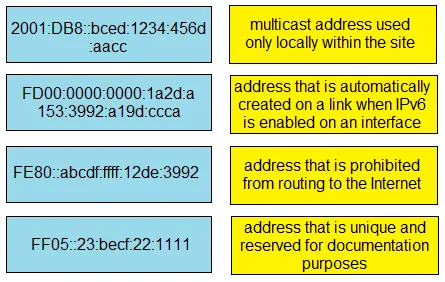
DRAG DROP - Drag and drop the characteristic from the left onto the IPv6 address type on the right.

This is an interactive task on the real exam — a drag-and-drop, hotspot or ordering question. There is nothing to select here, so the answer is shown below for reference.
Answer: See figure below

SIMULATION - Guidelines - This is a lab item in which tasks will be performed on virtual devices • Refer to the Tasks tab to view the tasks for this lab item. • Refer to the Topology tab to access the device console(s) and perform the tasks. • Console access is available for all required devices by clicking the device icon or using the tab(s) above the console window. • All necessary preconfigurations have been applied. • Do not change the enable password or hostname for any device. • Save your configurations to NVRAM before moving to the next item. • Click Next at the bottom of the screen to submit this lab and move to the next question. • When Next is clicked the lab closes and cannot be reopened. Topology -

Tasks - All physical cabling is in place. A company plans to deploy 64 new sites. The sites will utilize both IPv4 and IPv6 networks. 1. Subnet 10.30.64.0/19 to meet the subnet requirements and maximize the number of hosts • Using the second subnet - Assign the first usable IP address to e0/0 on Sw101 - Assign the last usable IP address to e0/0 on Sw102 2. Subnet 2001:db8::/56 to meet the subnet requirements and maximize the number of hosts • Using the second subnet - Assign an IPv6 GUA using a unique 64-Bit interface identifier on e0/0 on Sw101 - Assign an IPv6 GUA using a unique 64-Bit interface identifier on e0/0 on Sw102
This is an interactive task on the real exam — a drag-and-drop, hotspot or ordering question. There is nothing to select here, so the answer is shown below for reference.
Answer: See figure below
[ ] = Bianary representation 2001:0db8:0000:[0000 0000 xxxx xx00]::/62 where x -> subnet bits 2001:0db8:0000:[0000 0000 0000 0000]::/62 second subnet = 2001:0db8:0000:[0000 0000 0000 0100]::/62 Back to hex = 2001:0db8:0000:0004::/62 = 2001:db8:0:4::/62 Sw101(config)#ip routing Sw101(config)#ipv6 unicast-routing Sw101(config)#int e0/0 Sw101(config-if)#no switchport Sw101(config-if)#ip address 10.30.64.129 255.255.255.128 Sw101(config-if)#ipv6 2001:db88:0:4::/62 eui-64 Sw101(config-if)#no shutdown Sw102(config)#ip routing Sw102(config)#ipv6 unicast-routing Sw102(config)#int e0/0 Sw102(config-if)#no switchport Sw102(config-if)#ip address 10.30.64.254 255.255.255.128 Sw102(config-if)#ipv6 2001:db88:0:4::/62 eui-64 Sw102(config-if)#no shutdown write memory
Source: Adapted from community discussion — d5c03de
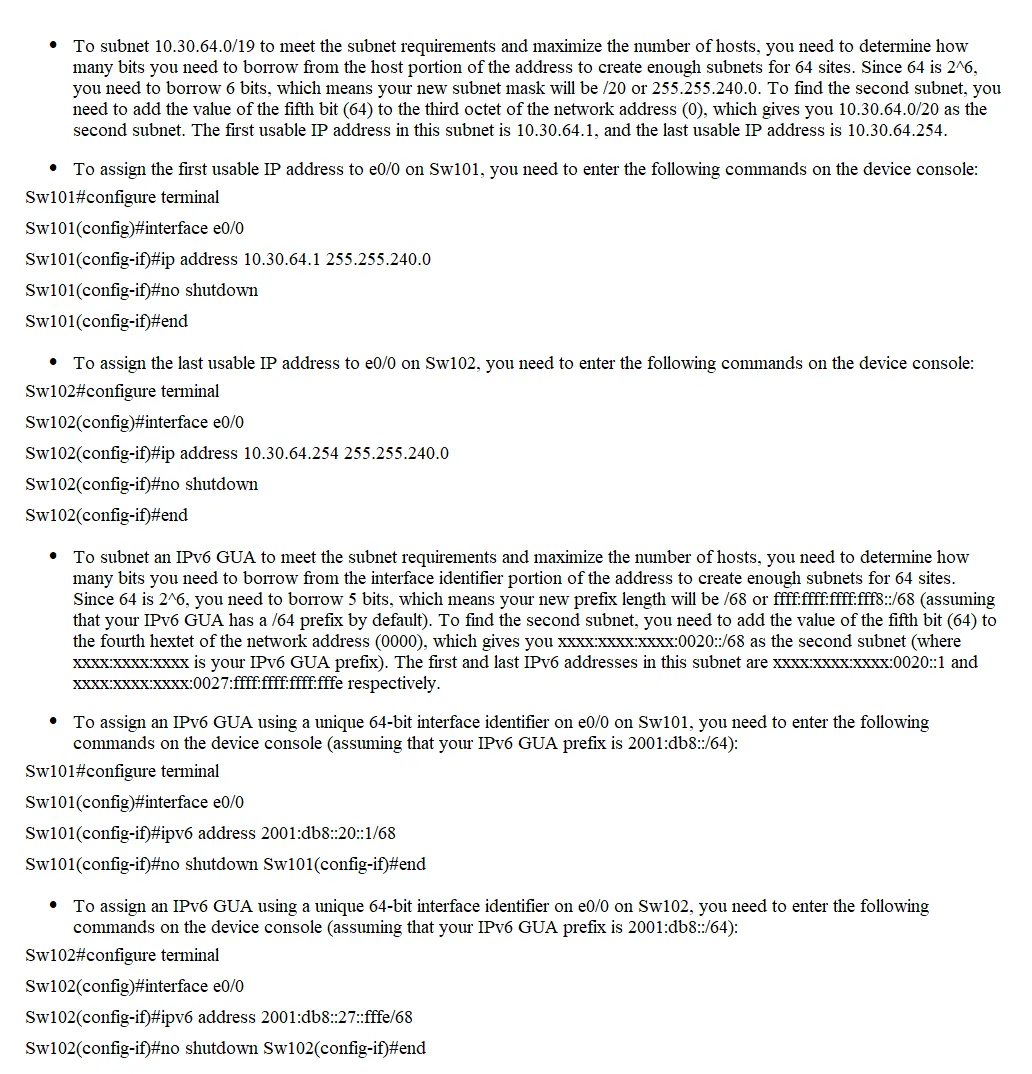
SIMULATION - Guidelines - This is a lab item in which tasks will be performed on virtual devices • Refer to the Tasks tab to view the tasks for this lab item. • Refer to the Topology tab to access the device console(s) and perform the tasks. • Console access is available for all required devices by clicking the device icon or using the tab(s) above the console window. • All necessary preconfigurations have been applied. • Do not change the enable password or hostname for any device. • Save your configurations to NVRAM before moving to the next item. • Click Next at the bottom of the screen to submit this lab and move to the next question. • When Next is clicked the lab closes and cannot be reopened. Topology -

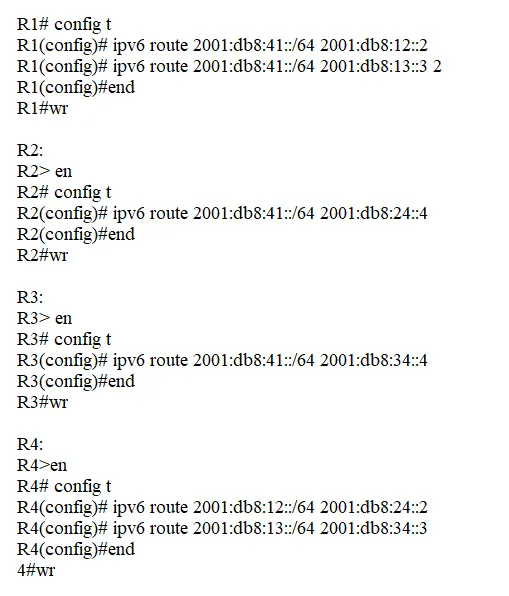
Tasks - All physical cabling is in place. Configurations should ensure that connectivity is established end-to-end. 1. Configure a route on R1 to ensure that R1 prefers R2 to reach the 2001:db8:41::/64 network 2. Configure a floating route on R1, and ensure that R1 uses R3 to reach the 2001 :db8:41::/64 network if the connection between R1 and R2 is down 3. Ping and traceroute should be working
This is an interactive task on the real exam — a drag-and-drop, hotspot or ordering question. There is nothing to select here, so the answer is shown below for reference.
Answer: See figure below
But why don't you just do what is asked of you? This complicates the mind of those who are learning. This is very clear, comrades. R1(config)#ipv6 route 2001:db8:41::/64 2001:db8:12::2 R1(config)#ipv6 route 2001:db8:41::/64 2001:db8:13::3 2 R1#ping 2001:db8:41::10 R1#tracert 2001:db8:41::10
Source: Adapted from community discussion — bymrdas

Refer to the exhibit. PC1 regularly sends 1800 Mbps of traffic to the server. A network engineer needs to configure the EtherChannel to disable Port Channel 1 between SW1 and SW2 when the Ge0/0 and Ge0/1 ports on SW2 go down. Which configuration must the engineer apply to the switch?
Answer: A
A is correct By setting the port-channel min-links to 2, the switch ensures that the port-channel interface will only remain operational if at least 2 physical links in the bundle are active and functioning. If the both 2 links ge0/0 AND ge0/1 on SW2 goes down, the overall link count drops below the configured minimum (2), causing the port-channel to go down as well.
Source: Adapted from community discussion — [Removed]
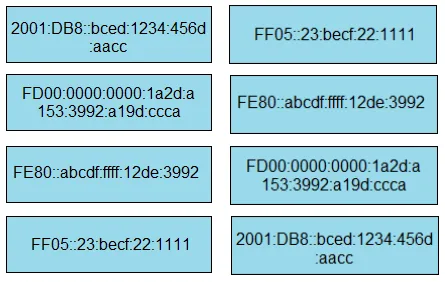
DRAG DROP - Drag and drop the IPv6 address types from the left onto their descriptions on the right. Select and Place:
This is an interactive task on the real exam — a drag-and-drop, hotspot or ordering question. There is nothing to select here, so the answer is shown below for reference.
Answer: See figure below
2001:DB8 = Address that is unique and reserved for documentation purposes FD00 = Address that is prohibited from routing to the Internet FE80 = Address that is automatically created on a link when IPv6 is enabled on an Interface FF05 = Multicast address used only locally within the site
Source: Adapted from community discussion — iMo7ed
An administrator is configuring a Cisco Catalyst switch so that it will accept management connections only from hosts in the 203.0.113.0/24 network. Other traffic passing through the switch must transit without interruption. Which two configurations must the engineer apply to the router? (Choose two.)
Answer: BC

Refer to the exhibit. PC1 tries to ping PC3 for the first time and sends out an ARP to S1. Which action is taken by S1?
Answer: A
Very weird question, but it made me wonder some interesting questions. Please, correct me if im wrong. - Is S1's ARP table supposed to be empty? If so, answer A would be correct, but it does not indicate that the ARP table is empty. The statement says that PC1 tries to ping PC3 for the first time, but we do not know if S1 already knows PC1's MAC because it has previously sent traffic to other devices, nor do we know if S1 has information from PC3 for the same reason. - Are the PCs supposed to be on different VLANs? It is assumed that it is, but it is not specified. - It is assumed that if they are not on the same VLAN, it is a "Router on a Stick so: In theory, if the PCs are not in the same VLAN, PC1 would directly send the frame to the default gateway on Router, because PC1 knows that PC3 is not in the same VLAN by looking at its own network mask. In any case, the key would be to know if S1's ARP table is empty or not. Information is clearly missing from the question.
Source: Adapted from community discussion — Rolfer
Which interface condition is occurring in this output?
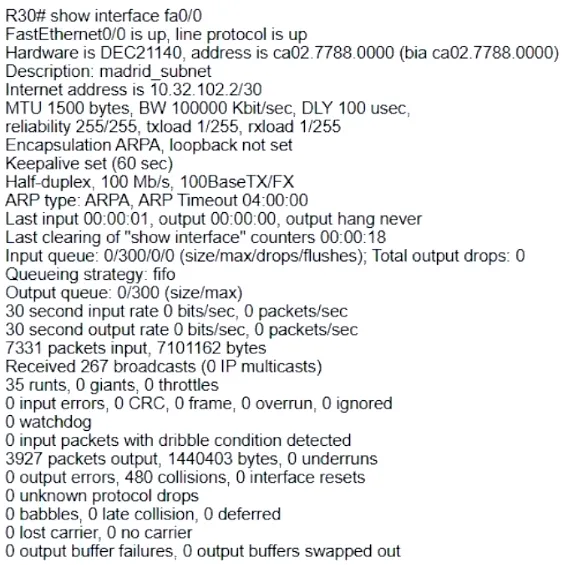
Answer: A

Refer to the exhibit. Which set of commands must be applied to the two switches to configure an LACP Layer 2 EtherChannel?
Answer: D
Keyboard:J Kmove between questionsA–Dselect an answerRshow or hide the answer← →change page
200-301 practice, question 331. 1334 questions available.
Version 1.0.0. How we source questions