Question 351 · 1334 in bank
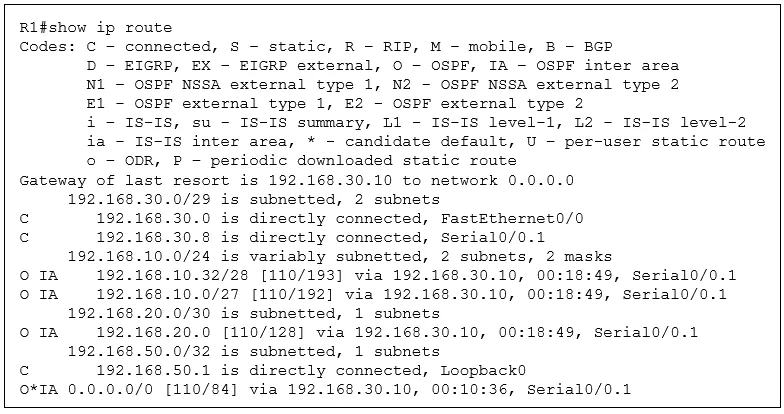
Refer to the exhibit. What is the metric for the route to the 192.168.10.33 host?
Show answer
Answer: D
Cisco Certified Network Associate (CCNA)1,334 questions across 134 pages are complete and free, with no account or card.
1334 questions in this bank
Free access · progress saved on this device
Refer to the exhibit. What is the metric for the route to the 192.168.10.33 host?
Answer: D
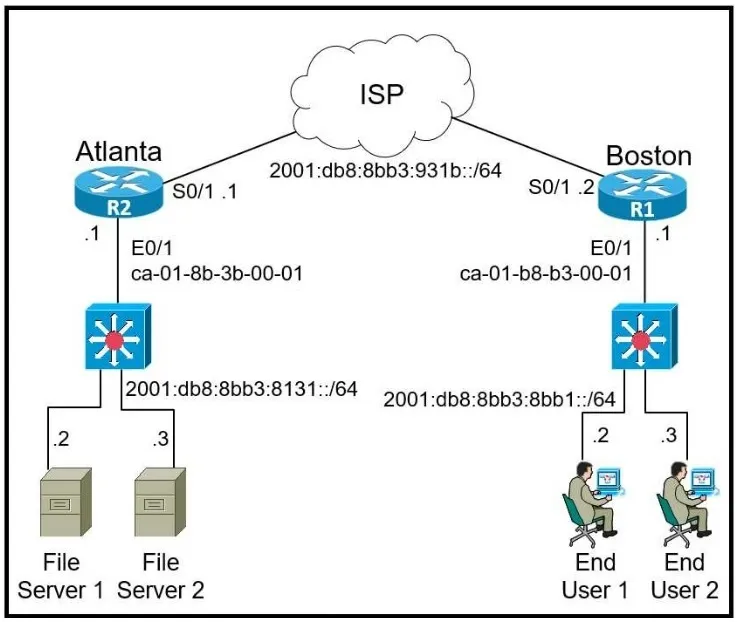
Refer to the exhibit. The IPv6 address for the LAN segment on router R1 must be configured using the EUI-64 format. When configured which ipv6 address is produced by the router?
Answer: C
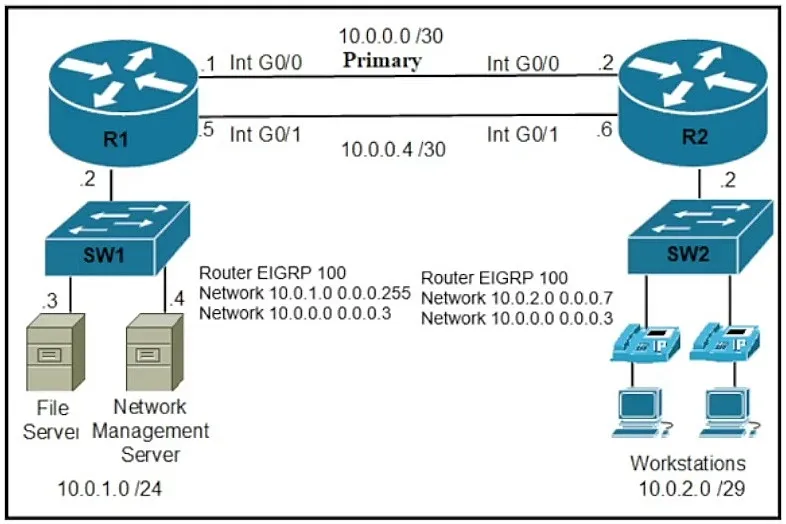
Refer to the exhibit. A secondary route is required on router R1 to pass traffic to the LAN network on R2 if the primary link fails. Which command must be entered to configure the router?
Answer: D

Refer to the exhibit. The LACP EtherChannel is configured, and the last change is to modify the interfaces on SwitchA to respond to packets received, but not to initiate negotiation. The interface range gigabitethernet0/0/0-15 command is entered. What must be configured next?
Answer: D
SIMULATION - Guidelines - This is a lab item in which tasks will be performed on virtual devices. • Refer to the Tasks tab to view the tasks for this lab item. • Refer to the Topology tab to access the device console(s) and perform the tasks. • Console access is available for all required devices by clicking the device icon or using the tab(s) above the console window. • All necessary preconfigurations have been applied. • Do not change the enable password or hostname for any device. • Save your configurations to NVRAM before moving to the next item. • Click Next at the bottom of the screen to submit this lab and move to the next question. • When Next is clicked, the lab closes and cannot be reopened. Topology -

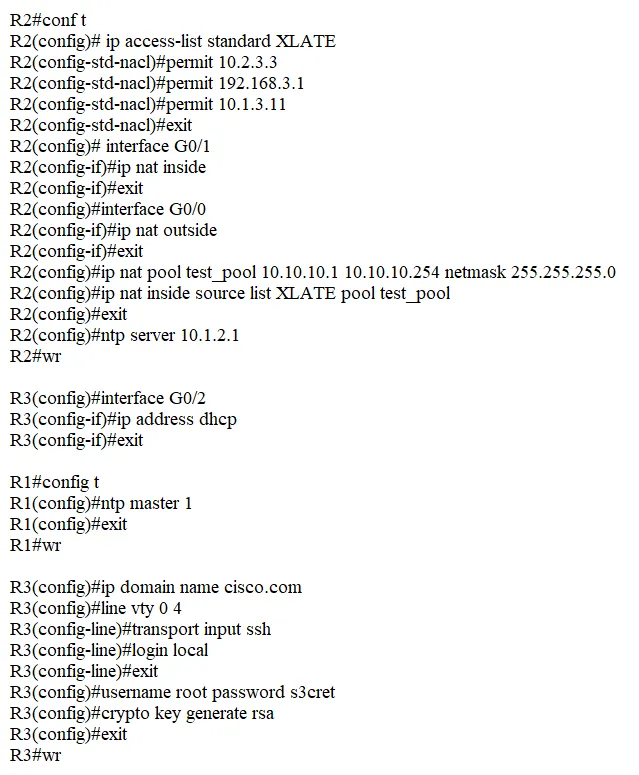
Tasks - IP connectivity between the three routers is established. IP Services must be configured in the order presented to complete the implementation. 1. Configure dynamic one-to-one address mapping on R2 using a standard list named XLATE, which allows all traffic to translate the source address of R3 to a pool named test_pool using the 10.10.10.0/24 network for traffic sent from R3 to R1. Avoid using an NVI configuration. Verify reachability by sending a ping to 192.168.100.1 from R3. 2. Configure R3 to dynamically receive an IP address on Ethernet0/2 from the DHCP server. 3. Configure R1 as an NTP server and R2 as a client, not as a peer, using the IP address 10.1.2.1. 4. Configure SSH access from R1 to R3, while excluding access via other remote connection protocols using the user root and password s3cret on router R3 using RSA. Verify connectivity from router R1 to R3 using a destination address assigned to interface E0/2 on R3.
This is an interactive task on the real exam — a drag-and-drop, hotspot or ordering question. There is nothing to select here, so the answer is shown below for reference.
Answer: See figure below
1. NAT ip access-list Standard XLATE permit ip 192.168.3.1 permit ip 10.2.3.3 permit ip 10.1.3.11 INT G0/1 ip nat inside int g0/0 ip nat outside IP nap pool test_pool 10.10.10.1 10.10.10.254 netmask 255.255.255.0 ip nat inside source list XLATE pool test-pool 2. e0/2 ip add dhcp 3. r1. NTP master 1 r2 ntp server 10.1.2.1 4. ssh from r1-r2 r3. access list standard r1-r3 permit 192.168.100.1 permit 10.1.3.1 permit 10.1.2.1 usename root sec s3cret ip domain nam .bt.bt cry key gen rsa 1024 line vty 0 4 login local tran in ssh access -class r1-r3 in
Source: Adapted from community discussion — 3040636
SIMULATION - Guidelines - This is a lab item in which tasks will be performed on virtual devices. • Refer to the Tasks tab to view the tasks for this lab item. • Refer to the Topology tab to access the device console(s) and perform the tasks. • Console access is available for all required devices by clicking the device icon or using the tab(s) above the console window. • All necessary preconfigurations have been applied. • Do not change the enable password or hostname for any device. • Save your configurations to NVRAM before moving to the next item. • Click Next at the bottom of the screen to submit this lab and move to the next question. • When Next is clicked, the lab closes and cannot be reopened. Topology -

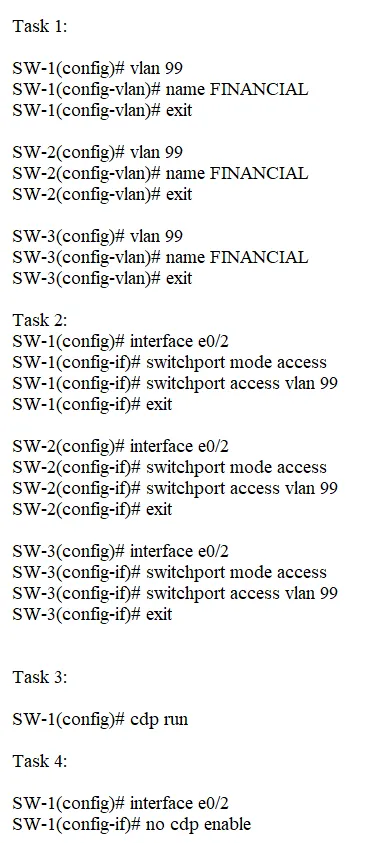
Tasks - All physical cabling is in place and verified. Connectivity for PC1, PC2 and PC3 must be established to the switches. Each port connecting to the PCs must be configured as an end-user port and only allow the designated VLAN. 1. Configure VLAN 99 on all three switches and label it exactly as FINANCIAL 2. Configure the switch ports connecting to PC1, PC2 and PC3 3. Cisco's neighbor discovery protocol has been disabled on SW-1 and must be re-enabled 4. PC1 must not be able to discover SW-1
This is an interactive task on the real exam — a drag-and-drop, hotspot or ordering question. There is nothing to select here, so the answer is shown below for reference.
Answer: See figure below
Task-1 SW-1 / SW-2 / SW-3 conf t vlan 99 name FINANCIAL end wr Task-2 SW-1 conf t interface e0/2 switchport mode access switchport access vlan 99 end wr SW-2 conf t interface e0/2 switchport mode access end wr SW-3 conf t interface e0/2 switchport mode access switchport access vlan 99 end wr Task-3 SW-1 conf t cdp run end wr Task-4 SW-1 conf t interface e0/2 no cdp enable end wr
Source: Adapted from community discussion — dasand

Refer to the exhibit. Network services must be enabled on interface Gi1/0/34. Which configuration meets the needs for this implementation?
Answer: C
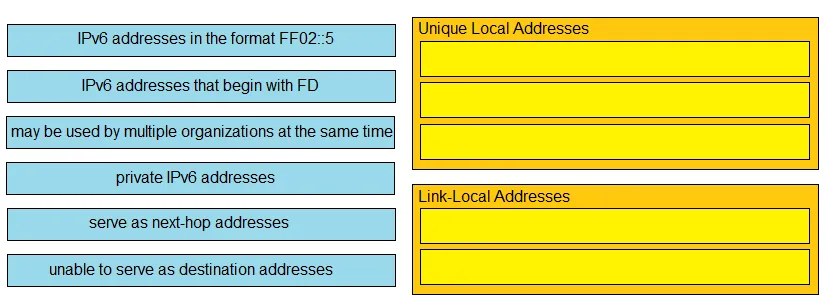
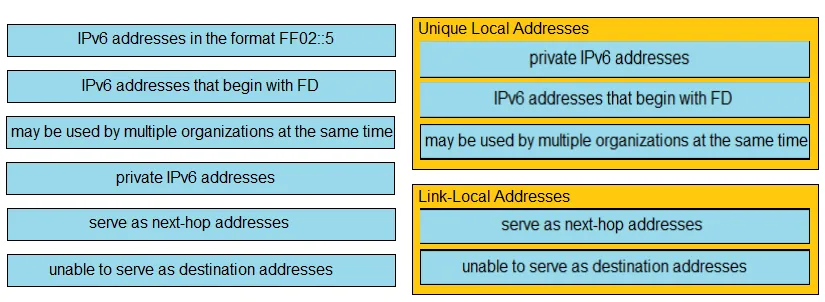
DRAG DROP - Drag and drop the IPv6 address descriptions from the left onto the IPv6 address types on the right. Not all options are used. Select and Place:
This is an interactive task on the real exam — a drag-and-drop, hotspot or ordering question. There is nothing to select here, so the answer is shown below for reference.
Answer: See figure below
Another typical Cisco style poorly designed question that tests word-by-word memorisation instead of networking skills. Link-Local is used for next-hop address on a local link, which is correct, but Unique Local can be used as a next-hop address, too. Private IPv6 addresses include Unique Local, but also include Link-Local. Would anyone argue that a Link-Local address is a public address? Not a private address? Link-Local definitely can be used as destination addresses. Otherwise, how does it serve as a next-hop address? How does it receive packets? Shame on you, Cisco. Wait to be replaced by other vendors and vendor-neutral certifications.
Source: Adapted from community discussion — Joshua25

Refer to the exhibit. How will the device handle a packet destined to IP address 100.100.100.100?
Answer: D
SIMULATION - Guidelines - This is a lab item in which tasks will be performed on virtual devices: • Refer to the Tasks tab to view the tasks for this lab item. • Refer to the Topology tab to access the device console(s) and perform the tasks. • Console access is available for all required devices by clicking the device icon or using the tab(s) above the console window. • All necessary pre-configurations have been applied. • Do not remove any existing configurations from the devices, only those necessary to make the appropriate changes required to fulfill the listed tasks. • Do not change the enable password or hostname for any device. • Save your configurations to NVRAM before moving to the next item. • Click Next at the bottom of the screen to submit this lab and move to the next question. • When Next is clicked, the lab closes and cannot be reopened. Topology -

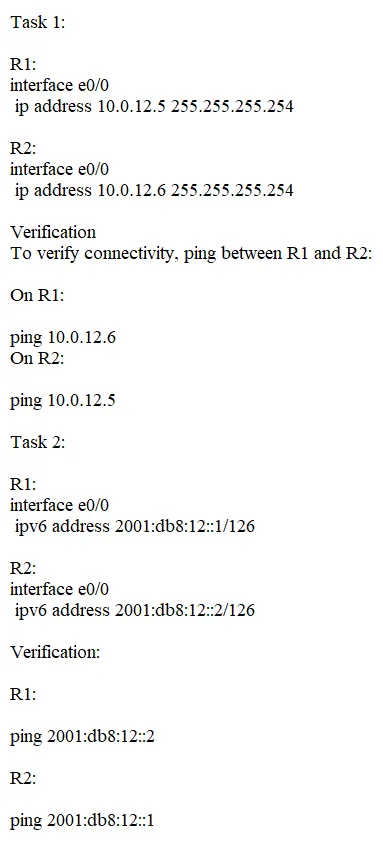
Tasks - Reference Topology Diagram and table. Configure IPv4 and IPv6 between the two routers. Task 1: • Configure R1 with the first usable host IP address in the IPv4 network. • Configure R2 with the last usable host IP address in the IPv4 network. • Verify connectivity using ping. Task 2: • Do not assign the subnet router anycast address to either router. • Configure R1 with the first usable host IP address in the IPv6 network. • Configure R2 with the last usable host IP address in the IPv6 network. • Verify connectivity using ping.
This is an interactive task on the real exam — a drag-and-drop, hotspot or ordering question. There is nothing to select here, so the answer is shown below for reference.
Answer: See figure below
provided answers are wrong : Task 1 the subnet mask is 255.255.255.252 Task 2 :in a /126 prefix we have only 2 bits left for the host meaning 00 = 0 ( we don't use that) 01 = 1 > first usable address and 11 (2+1)= 3 2001:db8:12::3/126 last usable address .
Source: Adapted from community discussion — matass_md
Keyboard:J Kmove between questionsA–Dselect an answerRshow or hide the answer← →change page
200-301 practice, question 351. 1334 questions available.
Version 1.0.0. How we source questions