Question 281 · 1334 in bank
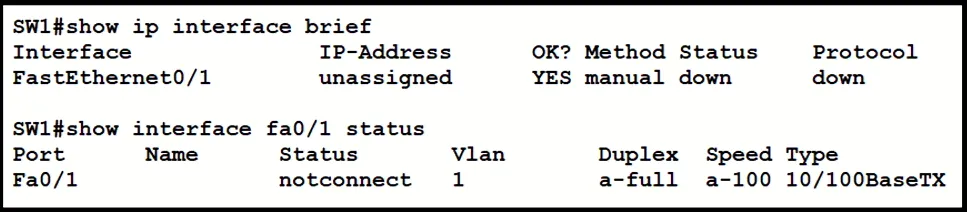
Refer to the exhibit. What is the cause of the issue?
Show answer
Answer: B
Explanation
The "Status" column indicates whether the interface is operational. "up" means the interface is active, while "down" means it's not operational. The "Protocol" column indicates the layer 3 protocol state. "up" means that IP is running on the interface, while "down" means that IP is not running. If there's a problem with the cable type, you might see an interface in the "down" state or with a status indicating a problem. For example, if the cable type is incorrect for an interface, it might remain in a down/down state. To diagnose the issue further, you could use additional commands such as "show interfaces" or "show controllers [interface]" to get more detailed information about the status of the interface and potential errors or issues.
Source: Adapted from community discussion — 16BitRun