Question 171 · 1334 in bank

Refer to the exhibit. Which switch becomes the root bridge?
Show answer
Answer: A
Cisco Certified Network Associate (CCNA)1,334 questions across 134 pages are complete and free, with no account or card.
1334 questions in this bank
Free access · progress saved on this device
Refer to the exhibit. Which switch becomes the root bridge?
Answer: A
What is a reason why a company would choose to use network automation in an enterprise?
Answer: A
"Let's quickly go over the main advantages of network automation: ... Key data services can be delivered more quickly, network performance can be improved, and the rollout of new services and applications can be accelerated." https://www.zenarmor.com/docs/network-basics/best-network-automation-tools Also, all the other answers are wrong.
Source: Adapted from community discussion — [Removed]
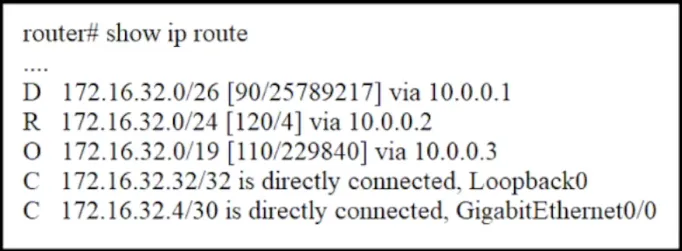
Refer to the exhibit. A packet sourced from 172.16.32.254 is destined for 172.16.32.8. What is the subnet mask of the preferred destination route?
Answer: C
Looking at the routes in the table: 172.16.32.0/26 via 10.0.0.1 172.16.32.0/24 via 10.0.0.2 172.16.32.0/19 via 10.0.0.3 Of these three, the /26 network (255.255.255.192) is the most specific subnet that would include the IP address 172.16.32.8. This is because a /26 network has a subnet mask with 64 IP addresses, and the range for the first /26 subnet in the 172.16.32.0 network would be from 172.16.32.0 to 172.16.32.63. Therefore, the subnet mask of the preferred destination route for the packet to reach 172.16.32.8 is: C. 255.255.255.192
Source: Adapted from community discussion — lmmujsi
SIMULATION - Guidelines - This is a lab item in which tasks will be performed on virtual devices • Refer to the Tasks tab to view the tasks for this lab item. • Refer to the Topology tab to access the device console(s) and perform the tasks • Console access is available for all required devices by clicking the device icon or using the tab(s) above the console window • All necessary preconfigurations have been applied • Do not change the enable password or hostname for any device • Save your configurations to NVRAM before moving to the next item • Click Next at the bottom of the screen to submit this lab and move to the next question • When Next is clicked the lab closes and cannot be reopened Topology -

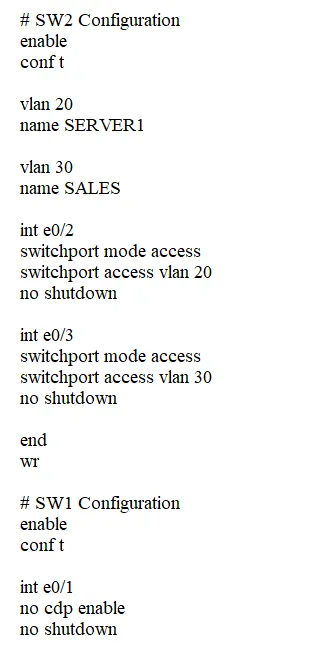
Tasks - R1 has been pre-configured with all the necessary commands. All physical cabling is in place and verified. Connectivity from PC1, PC3, and the Server must be established to the switches, and each port must only allow one VLAN. 1. Configure the VLAN connecting to the switch port for PC3 with the name "SALES" 2. Configure the switch port connecting to Server1 3. Configure the switch port connecting to PC3 4. Ensure R1 discovers SW-1 via the Cisco proprietary neighbor discovery protocol and all other devices on the network are unable to discover SW-1
This is an interactive task on the real exam — a drag-and-drop, hotspot or ordering question. There is nothing to select here, so the answer is shown below for reference.
Answer: See figure below
1. sw-2#conf t sw-2(config)#vlan 20 sw-2(config-vlan)#aname SERVER1 sw-2(config-vlan)#exit sw-2(config)#vlan 30 sw-2(config-vlan)#name SALES sw-2(config-vlan)#exit 2. sw-2(config)#interface ETH0/2 sw-2(config-if)#sw-1port mode access sw-2(config-if)#sw-1port access vlan 20 sw-2(config-if)#no sh sw-2(config-if)#exit 3 sw-2(config)#interface ETH0/3 sw-2(config-if)#sw-1port mode access sw-2(config-if)#sw-1port access vlan 30 sw-2(config-if)#no sh sw-2(config-if)#end sw-2#wr 4. sw-1#configure t sw-1(config)#cdp run sw-1(config)#interface fastEthernet 0/1 sw-1(config-if)#cdp enable sw-1(config-if)#no sh sw-1(config)#interface fastEthernet 0/2 sw-1(config-if)#no cdp enable sw-1(config-if)#no sh sw-1(config-if)#end sw-1#wr to end, you can use a show cdp neig in R1 and SW-2
Source: Adapted from community discussion — Cobramago
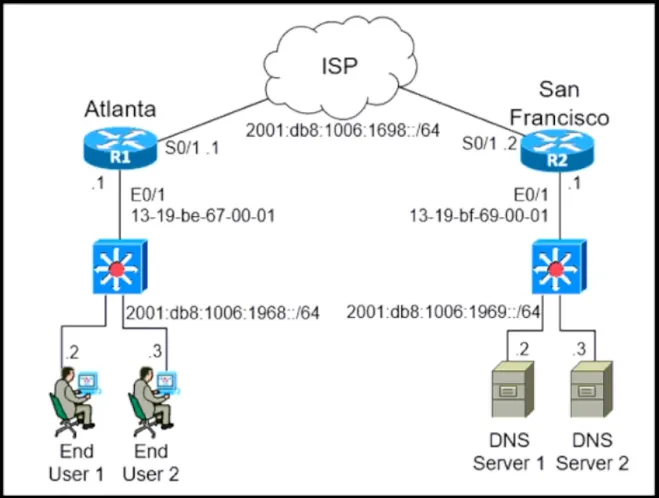
Refer to the exhibit. The IPv6 address for the LAN segment on router R1 must be configured using the EUI-64 format. When configured which Ipv6 address Is produced by the router?
Answer: B
The E0/1 interface is the Router interface we are looking at. The first four hex digits of that MAC address is 13-19. Convert the first 2 hex digits into binary: 1 = 0001 3 = 0011 Together: 0001-0011 Convert the 7th bit: 0001-0001 This leaves us with 11 Combine with the other 2 hex digits: 11-19 Thus, it is option B.
Source: Adapted from community discussion — cedc60e
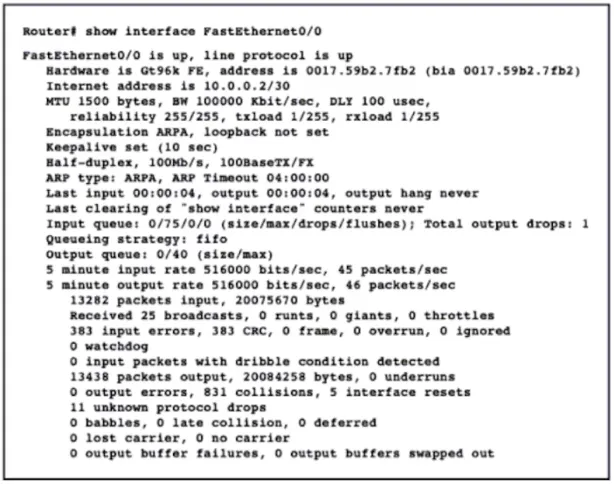
Refer to the exhibit. Users at a branch office are experiencing application performance issues, poor VoIP audio quality, and slow downloads. What is the cause of the issues?
Answer: B
SIMULATION - Guidelines - This is a lab item in which tasks will be performed on virtual devices: • Refer to the Tasks tab to view the tasks for this lab item. • Refer to the Topology tab to access the device console(s) and perform the tasks • Console access is available for all required devices by clicking the device icon or using the tab(s) above the console window • All necessary preconfigurations have been applied • Do not change the enable password or hostname for any device • Save your configurations to NVRAM before moving to the next item • Click Next at the bottom of the screen to submit this lab and move to the next question • When Next is clicked the lab closes and cannot be reopened Topology -

Tasks - All physical cabling is in place. Routers R3 and R4 are fully configured and inaccessible. Configure static routes for various connectivity to the ISP and the LAN that resides on R4. 1. Configure a route on R1 to ensure that R1 prefers R2 when traffic is destined to the server only. 2. Configure a default route on R2 to the ISP 3. Configure a route on R1 to ensure that R1 will use R2 for the R4 LAN if the link fails between R3 and R4 4. Configure a route on R1 to ensure that R1 prefers R3 when traffic is destined to the R4 LAN at 10.0.41.0/24
This is an interactive task on the real exam — a drag-and-drop, hotspot or ordering question. There is nothing to select here, so the answer is shown below for reference.
Answer: See figure below
I think the answer is fine, but it is assuming that those are indeed the next hop addresses and it is not specified in the diagram. To be safe, I would put the exit interface number as Next Hop. Same with the administrative distance for the floating route, 200 is fine, but it can also be any other number.
Source: Adapted from community discussion — Fervidales

An engineer needs to configure an access point to forward all client traffic through a wireless controller. Which mode must be enabled to accomplish this task?
Answer: A
A is correct In local mode, the access point establishes a CAPWAP (Control and Provisioning of Wireless Access Points) tunnel to the WLC and forwards all client traffic to the controller for processing and management. This allows the controller to apply policies, security measures, and other configurations centrally, providing better control and visibility over the wireless network.
Source: Adapted from community discussion — [Removed]
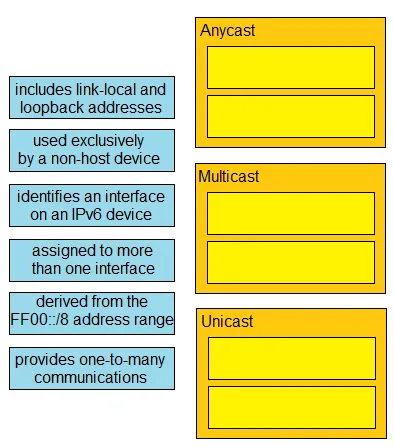
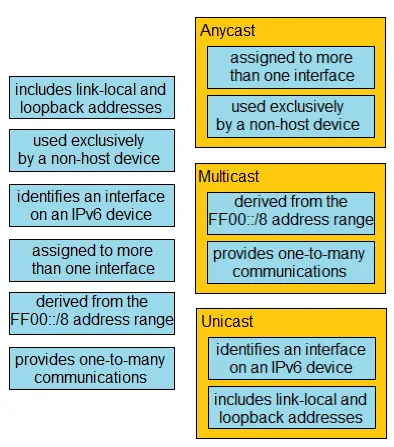
DRAG DROP - Drag and drop the IPv6 address details from the left onto the corresponding types on the right. Select and Place:
This is an interactive task on the real exam — a drag-and-drop, hotspot or ordering question. There is nothing to select here, so the answer is shown below for reference.
Answer: See figure below
This is solved through the process of elimination and a bit of lateral thinking. Let's look at the first two categories first (the easier ones)... Multicast: 1. Derived from the FFOO::/8 address range. Can't argue with that. 2. Provides one-to-many communications. That's what multicast is , one-to-many. Unicast: 1. Includes Link-Local and Loopback addresses. Yip, these are single destinations. 2. Identifies an interface on an IPv6 device. Again, yip - it's a single destination. AnyCast: 1. Used exclusively by a non-host device. I think what they are alluding to here is that this address is associated with a group of servers that share an IP address, not a single host (non-host). 2. Assigned to more than one interface. Yes - by definition its one-to-closest, so that implies there's more than one instance of it, so it must be assigned to more than one interface. Done - Danny7 (the suggested answer) is correct.
Source: Adapted from community discussion — PaddyInNZ
An Ethernet frame arrived at switch interface G0/1, but the destination MAC address is missing from the MAC address table. How does the switch process the frame?
Answer: D
Keyboard:J Kmove between questionsA–Dselect an answerRshow or hide the answer← →change page
200-301 practice, question 171. 1334 questions available.
Version 1.0.0. How we source questions