Question 131 · 1334 in bank
How does frame switching function on a switch?
Show answer
Answer: C
Cisco Certified Network Associate (CCNA)1,334 questions across 134 pages are complete and free, with no account or card.
1334 questions in this bank
Free access · progress saved on this device
How does frame switching function on a switch?
Answer: C
DRAG DROP - Drag and drop the characteristic from the left onto the IPv6 address type on the right.

This is an interactive task on the real exam — a drag-and-drop, hotspot or ordering question. There is nothing to select here, so the answer is shown below for reference.
Answer: See figure below
given answer is not correct, anycast : assigned to multiple devices, & routed to the nearest interface multicast: cant be used as a source address and provides communication one to many
Source: Adapted from community discussion — studying_1

What is represented by the word "port" within this JSON schema?

Answer: C
A network engineer is installing an IPv6-only capable device. The client has requested that the device IP address be reachable only from the internal network. Which type of IPv6 address must the engineer assign?
Answer: B
It should be B! Only reachable from the internal network, not the internet. https://www.ciscopress.com/articles/article.asp?p=2803866&seqNum=4 Global unicast: A routable address in the IPv6 Internet, similar to a public IPv4 address. Link-local: Used only to communicate with devices on the same local link. Loopback: An address not assigned to any physical interface that can be used for a host to send an IPv6 packet to itself. Unspecified address: Used only as a source address and indicates the absence of an IPv6 address. Unique local: Similar to a private address in IPv4 (RFC 1918) and not intended to be routable in the IPv6 Internet. However, unlike RFC 1918 addresses, these addresses are not intended to be statefully translated to a global unicast address. IPv4 embedded: An IPv6 address that carries an IPv4 address in the low-order 32 bits of the address.
Source: Adapted from community discussion — [Removed]
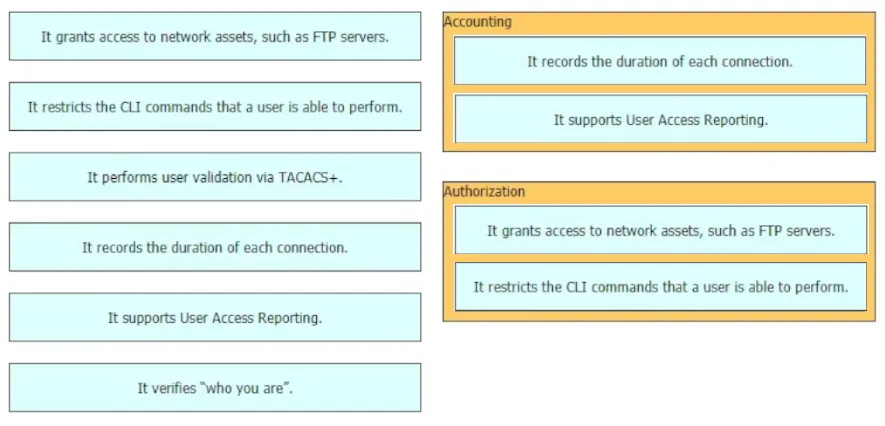
DRAG DROP - Drag and drop the statements about AAA services from the left to the corresponding AAA services on the right. Not all options are used.

This is an interactive task on the real exam — a drag-and-drop, hotspot or ordering question. There is nothing to select here, so the answer is shown below for reference.
Answer: See figure below
Which interface condition is occurring in this output?
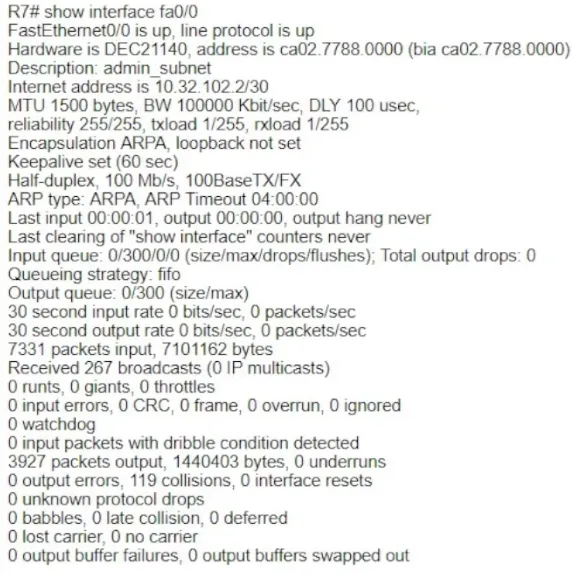
Answer: C
there are 119 collisions, caused by duplex mismatch, which can be seen on the half duplex side( if one side is configured half duplex and the other one full duplex)
Source: Adapted from community discussion — studying_1
DRAG DROP - Drag and drop the IPv6 address from the left onto the type on the right.

This is an interactive task on the real exam — a drag-and-drop, hotspot or ordering question. There is nothing to select here, so the answer is shown below for reference.
Answer: See figure below
CCNA is fundamental knowledge, but most of the questions expect you to become a walking Cisco manual. Most of this stuff you will forget and then look up as you need it on the job; fundamentals will stick with you. Most of the value in the CCNA is conferring a basic understanding of networking principles.
Source: Adapted from community discussion — [Removed]

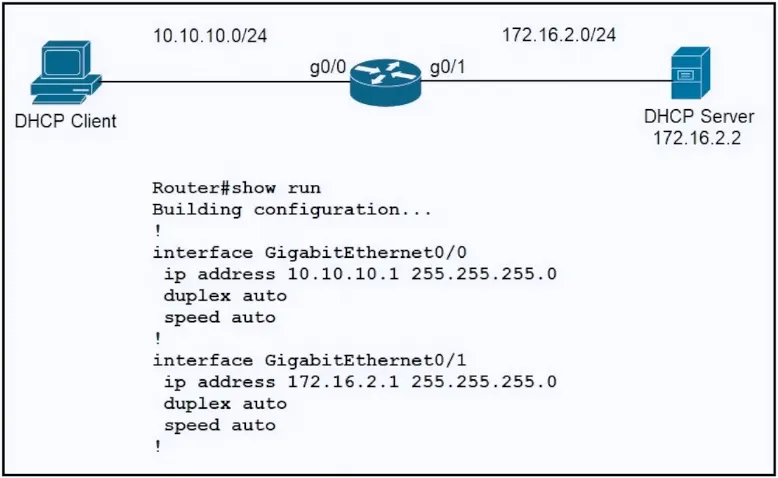
Refer to the exhibit. An engineer is configuring a new router on the network and applied this configuration. Which additional configuration allows the PC to obtain its IP address from a DHCP server?
Answer: A
The correct answer is A. **Configure the ip helper-address 172.16.2.2 command under interface Gi0/0.** When a router is acting as an intermediary between a DHCP client (such as a PC) and a DHCP server, the `ip helper-address` command is used to forward DHCP requests from clients in one subnet to a DHCP server in another subnet. This command is configured on the interface that is in the same subnet as the DHCP clients. In this case, configuring `ip helper-address 172.16.2.2` under interface Gi0/0 will allow the router to forward DHCP requests from the PC to the DHCP server at the specified IP address (172.16.2.2). This is a common practice when DHCP servers are located on a different subnet than the DHCP clients.
Source: Adapted from community discussion — 16BitRun
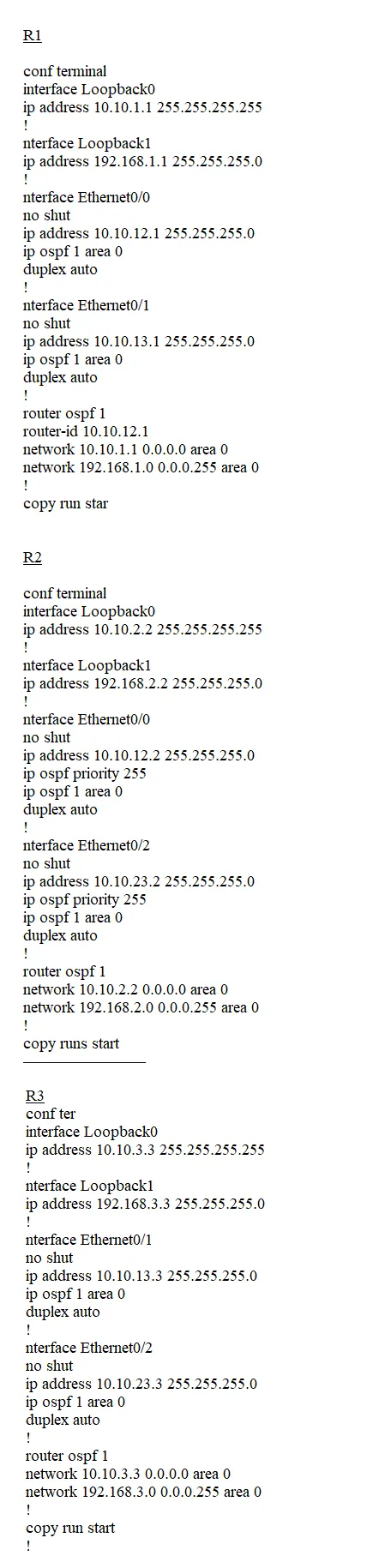
SIMULATION - Guidelines - This is a lab item in which tasks will be performed on virtual devices. • Refer to the Tasks tab to view the tasks for this lab item. • Refer to the Topology tab to access the device console(s) and perform the tasks • Console access is available for all required devices by clicking the device icon or using the tab(s) above the console window • All necessary preconfigurations have been applied • Do not change the enable password or hostname for any device • Save your configurations to NVRAM before moving to the next item • Click Next at the bottom of the screen to submit this lab and move to the next question • When Next is clicked the lab closes and cannot be reopened Topology -

Tasks - IP connectivity between the three routers is configured. OSPF adjacencies must be established. 1. Configure R1 and R2 Router IDs using the interface IP addresses from the link that is shared between them. 2. Configure the R2 links with a max value facing R1 and R3. R2 must become the DR. R1 and R3 links facing R2 must remain with the default OSPF configuration for DR election. Verify the configuration after clearing the OSPF process. 3. Using a host wildcard mask, configure all three routers to advertise their respective Loopback1 networks. 4. Configure the link between R1 and R3 to disable their ability to add other OSPF routers.

This is an interactive task on the real exam — a drag-and-drop, hotspot or ordering question. There is nothing to select here, so the answer is shown below for reference.
Answer: See figure below
The question said the IP connectivity has been configured, this means that the routers can communicate with one another and the interfaces have been configured with the corresponding IPs. To check if the interfaces have been configured with IPs, use the "show ip interface brief" command. Task 1 R1(config)#router ospf 1 R1(config-router)#router-id 10.10.12.1 R1(config-router)# exit R1(config)# do wr R2(config)#router ospf 1 R2(config-router)#router-id 10.10.12.2 R2(config-router)# exit R2(config)# do wr Task 2 R2(config)#interface range gigabitEthernet 0/0 , gigabitEthernet 0/2 R2(config-if-range)#ip ospf priority 255 R2#clear ip ospf process Reset ALL OSPF processes? [no]: yes R2# wr
Source: Adapted from community discussion — AbdullahMohammad251
DRAG DROP - Drag and drop the characteristic from the left onto the IPv6 address type on the right.

This is an interactive task on the real exam — a drag-and-drop, hotspot or ordering question. There is nothing to select here, so the answer is shown below for reference.
Answer: See figure below
Anycast: is assigned to more than one interface is used exclusively by a non-host device Multicast: cannot be used as a source address provides one-to-many communications
Source: Adapted from community discussion — lmmujsi

Keyboard:J Kmove between questionsA–Dselect an answerRshow or hide the answer← →change page
200-301 practice, question 131. 1334 questions available.
Version 1.0.0. How we source questions