Question 71 · 1003 in bank
SIMULATION - Guidelines - This is a lab item in which tasks will be performed on virtual devices. • Refer to the Tasks tab to view the tasks for this lab item. • Refer to the Topology tab to access the device console(s) and perform the tasks. • Console access is available for all required devices by clicking the device icon or using the tab(s) above the console window. • All necessary preconfigurations have been applied. • Do not change the enable password or hostname for any device. • Save your configurations to NVRAM before moving to the next item. • Click Next at the bottom of the screen to submit this lab and move to the next question. • When Next is clicked, the lab closes and cannot be reopened. Topology -
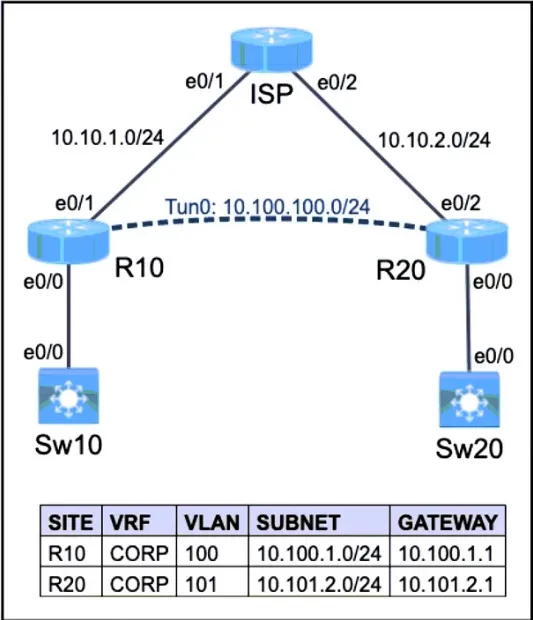
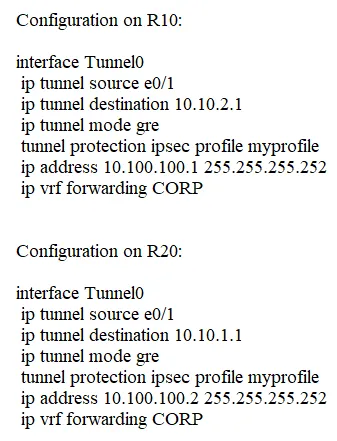
Tasks - The operations team started configuring network devices for a new site. R10 and R20 are preconfigured with the CORP VRF. R10 has network connectivity to R20. Complete the configurations to achieve these goals: 1. Extend the CORP VRF between R10 and R20 using Tunnel0. 2. Protect Tunnel0 using the preconfigured profile.

This is an interactive task on the real exam — a drag-and-drop, hotspot or ordering question. There is nothing to select here, so the answer is shown below for reference.
Show the answer figure
Answer: See figure below
Explanation
the ip vrf forwarding command should be the first command as this usually removes the IP address which will need to be added back again.
Source: Adapted from community discussion — acook0411