SIMULATION - Guidelines - This is a lab item in which tasks will be performed on virtual devices. • Refer to the Tasks tab to view the tasks for this lab item. • Refer to the Topology tab to access the device console(s) and perform the tasks. • Console access is available for all required devices by clicking the device icon or using the tab(s) above the console window. • All necessary preconfigurations have been applied. • Do not change the enable password or hostname for any device. • Save your configurations to NVRAM before moving to the next item. • Click Next at the bottom of the screen to submit this lab and move to the next question. • When Next is clicked, the lab closes and cannot be reopened. Topology -
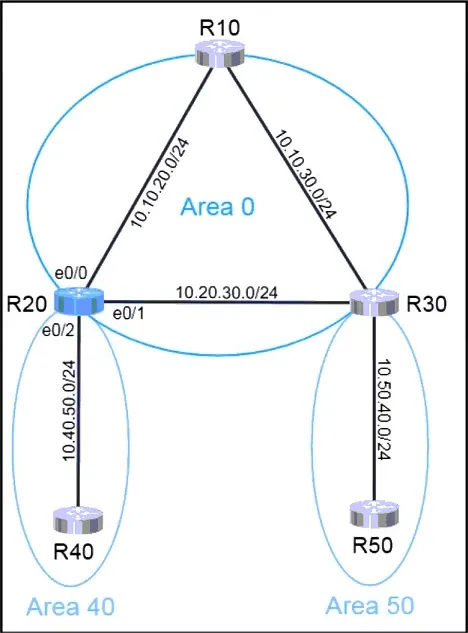
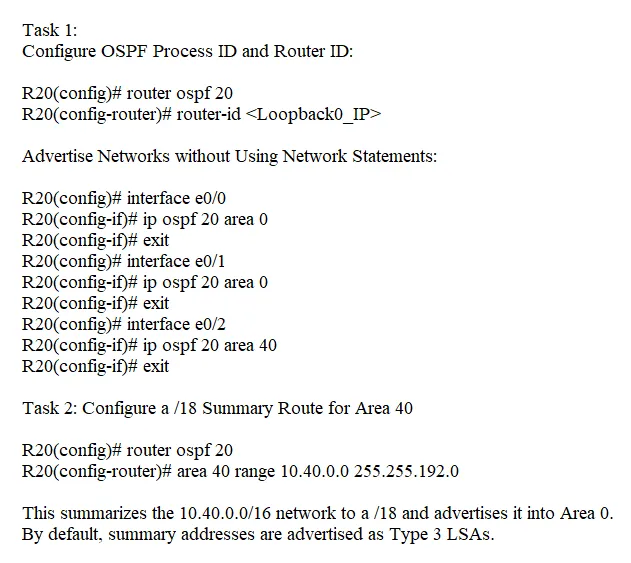
Tasks - OSPF is preconfigured on all devices except R20. Configure R20 to complete these tasks. Task 1: Configure OSPF according to the topology using these requirements: • Use Process ID 20. • Use Loopback0 for the Router ID. • Advertise all networks into OSPF. o Do not use network statements under the OSPF process to accomplish this task. Task 2: Configure a /18 summary route for Area 40. • Advertise only Type 3 LSAs into Area 0. R20 -

This is an interactive task on the real exam — a drag-and-drop, hotspot or ordering question. There is nothing to select here, so the answer is shown below for reference.