Question 151 · 239 in bank
HOTSPOT - You have three Hyper-V hosts named Server1, Server2, and Server3 that run Windows Server, Server1 hosts a virtual machine named VM1. You enable Hyper-V Replica to replicate VM1 to Server2 and set the replication frequency to 30 seconds. You need to extend the replication and create a second replica of VM1. On which Hyper-V hosts should you configure the replication, and what is the minimum replication frequency you can use? To answer, select the appropriate options in the answer area. NOTE: Each correct selection is worth one point.

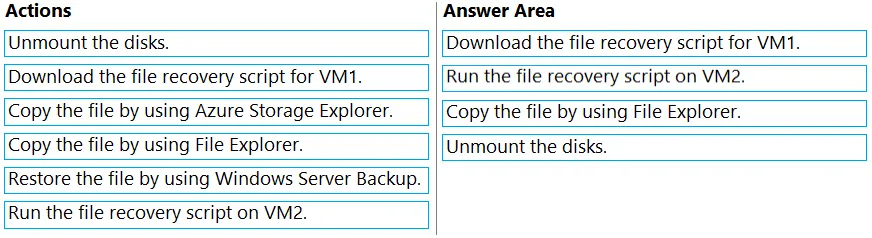
This is an interactive task on the real exam — a drag-and-drop, hotspot or ordering question. There is nothing to select here, so the answer is shown below for reference.
Show the answer figure
Answer: See figure below
Explanation
Extend Replication through UI: Before you Extend Replication to third site, you need to establish the replication between a primary server and replica server. Once that is done, go to replica site and from Hyper-V UI manager select the VM for which you want to extend the replication. Right click on VM and select “ **Replication- >Extend Replication …”. **This will open Extend Replication Wizard which is similar to Enable Replication Wizard. Few points to be taken care are: 1. In Configure Replication frequency screen , note that Extend Replication only supports 5 minute and 15 minute Replication frequency. Also note that replication frequency of extend replication should be at least equal to or greater than primary replication relationship. https://learn.microsoft.com/en-us/virtualization/community/team-blog/2013/20131209-hyper-v-replica-extend-replication
Source: Adapted from community discussion — ant_12
References