Question 91 · 239 in bank
You have the servers shown in the following table.

You need to ensure that you can validate network connectivity from Server1 to Server2 by using the ping command. What should you do first?
Show answer
Answer: A
Configuring Windows Server Hybrid Advanced Services239 questions across 24 pages are complete and free, with no account or card.
239 questions in this bank
Free access · progress saved on this device
You have the servers shown in the following table.
You need to ensure that you can validate network connectivity from Server1 to Server2 by using the ping command. What should you do first?
Answer: A
You have a three-node failover cluster. You need to run pre-scripts and post-scripts when Cluster-Aware Updating (CAU) runs. The solution must minimize administrative effort. What should you use?
Answer: B
You have an on-premises server named Server1 that runs Windows Server. Server1 contains multiple file shares and has an IP address of 192.168.10.12. You have an Azure subscription. You need to migrate the Server1 file shares to an Azure virtual machine by using Storage Migration Service. The solution must ensure that on-premises users can access the migrated file shares by using the 192.168.10.12 IP address. What should you include in the solution?
Answer: D
Note: This question is part of a series of questions that present the same scenario. Each question in the series contains a unique solution that might meet the stated goals. Some question sets might have more than one correct solution, while others might not have a correct solution. After you answer a question in this section, you will NOT be able to return to it. As a result, these questions will not appear in the review screen. You have a failover cluster named Cluster1 that hosts an application named App1. The General tab in App1 Properties is shown in the General exhibit. (Click the General tab.)

The Failover tab in App1 Properties is shown in the Failover exhibit. (Click the Failover tab.)
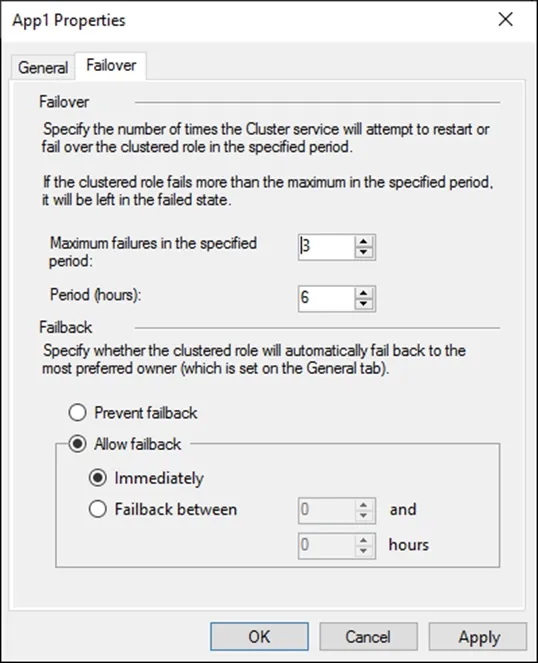
Server1 shuts down unexpectedly. You need to ensure that when you start Server1, App1 continues to run on Server2. Solution: You pause the Server1 node in Cluster1 and then start Server1. Does this meet the goal?
Answer: B
"You need to ensure that when you start Server1, App1 continues to run on Server2" The app is running on Server2 already. We paused server1 and boot it. This means that app will not move to Server1. Is this the best solution I do not think so but it will work. Pause make server1 not accessible for the app.
Source: Adapted from community discussion — phi3nix
You have two on-premises servers named Server1 and Server2 that run Windows Server. Server2 contains a Hyper-V virtual machine named VM1. You have an Azure subscription that contains a Recovery Services vault. You need to configure Azure Site Recovery to replicate workloads from the on-premises environment to Azure. What should you do first?
Answer: D
Your network contains an Active Directory Domain Services (AD DS) domain. The domain contains two servers named Server1 and Server2. Server1 runs Windows Server 2019 and hosts multiple printers. Server2 runs Windows Server 2025. Both servers have the Print and Document Services server role installed. You need to migrate the printers hosted on Server1 to Server2. The solution must minimize administrative effort. What tools can you use?
Answer: A
You have an Azure subscription. The subscription contains two virtual machines named VM1 and VM2 that run Windows Server. VM1 experiences a stop error and fails to start. You need to review the memory dump file of the error. What should you do first?
Answer: B
Note: This question is part of a series of questions that present the same scenario. Each question in the series contains a unique solution that might meet the stated goals. Some question sets might have more than one correct solution, while others might not have a correct solution. After you answer a question in this section, you will NOT be able to return to it. As a result, these questions will not appear in the review screen. You have a failover cluster named Cluster1 that hosts an application named App1. The General tab in App1 Properties is shown in the General exhibit. (Click the General tab.)
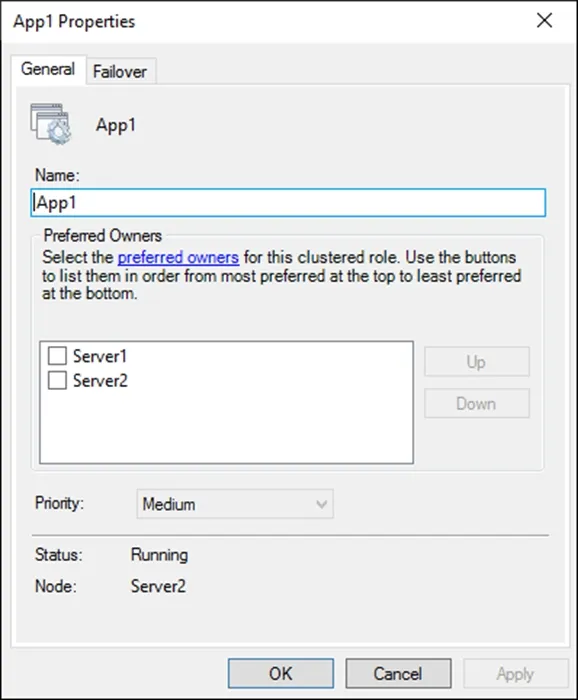
The Failover tab in App1 Properties is shown in the Failover exhibit. (Click the Failover tab.)
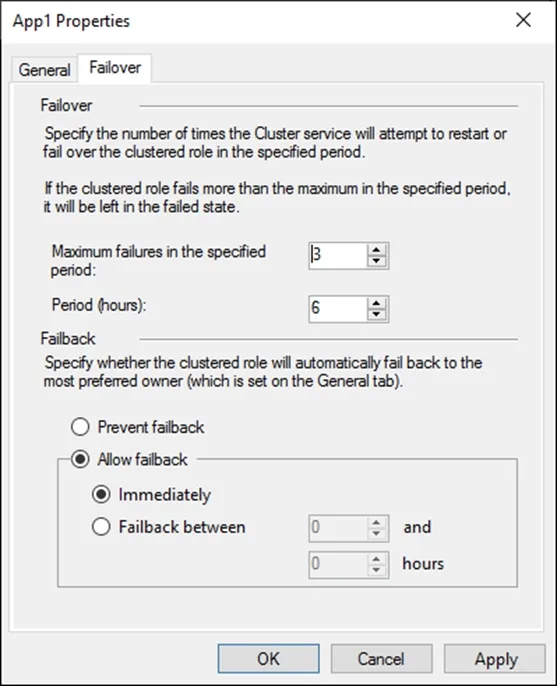
Server1 shuts down unexpectedly. You need to ensure that when you start Server1, App1 continues to run on Server2. Solution: From the General settings, you increase the priority of Server2 in the Preferred Owners list. Does this meet the goal?
Answer: A
A horribly worded question. You can only change the priority of the Preferred Owners if you tick them first, if you don't then any change in order isn't kept. So to actually increase the priority of Server2 you *have* to tick it. Otherwise you're *NOT* changing the priority. The question however doesn't state that you tick it. So is the question asking if you know this? Or is it assuming that you know that the only way to actually change the priority is to tick them first? As it stands, if you assume that you actually change the priority then you have to tick Server2 to do so and the answer is Yes. If you change the Priority order without ticking then it is the same as moving the server up, wont change the order, will leave it without a preferred owner (so it won't fail over to Server1 anyway) but it doesn't fulfil the requirement of *Ensuring* that it won't fail over to Server1 so the answer is No.
Source: Adapted from community discussion — Fastdruid
Your on-premises network contains an Active Directory Domain Services (AD DS) domain. The domain contains a server named Server1 that runs Windows Server and is in an organizational unit (OU) named OU1. You have a Group Policy Object (GPO) that is linked to OU1 and has the Windows Defender SmartScreen settings shown in the following table.

You have the apps shown in the following table.

Which apps can you install on Server1?
Answer: A
Your company uses Storage Spaces Direct. You need to view the available storage in a Storage Space Direct storage pool. What should you use?
Answer: D
Open the Windows Admin Center web interface in your browser. Connect to the server running the Storage Spaces Direct cluster. In the left navigation pane, click on "Storage Spaces Direct" under the "Storage" section. Click on the "Pools" tab to see a list of the storage pools in the cluster. Select the storage pool you want to view and click on the "Usage" tab. The "Usage" tab will show you a breakdown of the available storage in the pool, including the total capacity, the amount of storage in use, and the amount of free space. D is correct
Source: Adapted from community discussion — syu31svc
Keyboard:J Kmove between questionsA–Dselect an answerRshow or hide the answer← →change page
AZ-801 practice, question 91. 239 questions available.
Version 1.0.0. How we source questions