Question 121 · 396 in bank
HOTSPOT - You have a Microsoft 365 E5 subscription that contains a SharePoint site named Site1. Site1 contains the files shown in the following table.

You have the users shown in the following table.

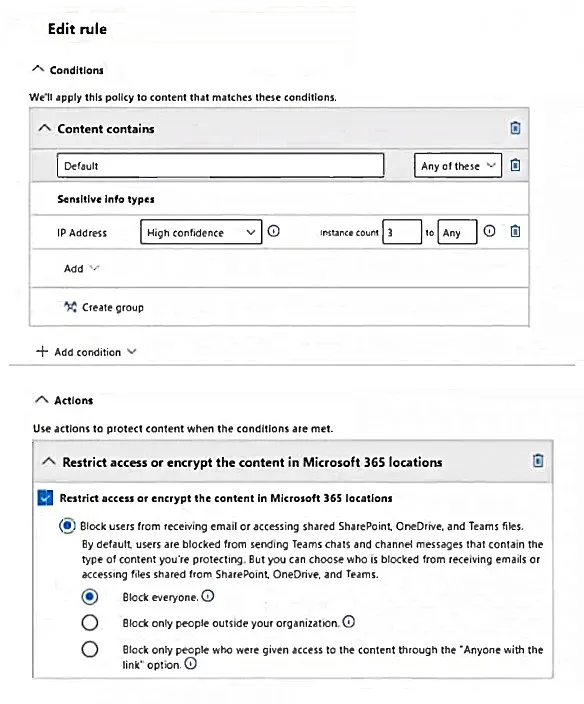
You create a data loss prevention (DLP) policy with an advanced DLP rule and apply the policy to Site1. The DLP rule is configured as shown in the following exhibit.
For each of the following statements, select Yes if the statement is true. Otherwise, select No. NOTE: Each correct selection is worth one point.

This is an interactive task on the real exam — a drag-and-drop, hotspot or ordering question. There is nothing to select here, so the answer is shown below for reference.
Show the answer figure
Answer: See figure below
Explanation
1.User1 can open File2: NO User1 is a Site owner and has the highest level of permissions. However, the DLP policy blocks access to files that contain sensitive information if the content meets the criteria of having an instance count of 3 to Any for the sensitive info type (IP Address). File2 contains 5 IP addresses, which triggers the policy, blocking access. 2. User2 can open File1: YES User2 is a Site Member with permissions to access files. File1 contains only 2 IP addresses, which does not meet the DLP policy's condition of having at least 3 instances. Therefore, User2 can still access File1. 3. Admin1 can open File2: NO Admin1, as a SharePoint Admin, typically has full control over SharePoint sites. However, the DLP policy is applied to restrict access to the content based on the defined rules, which applies to all users, including admins. Since File2 meets the criteria of the DLP policy, access is blocked.
Source: Adapted from community discussion — Tr619899
References