Question 171 · 370 in bank
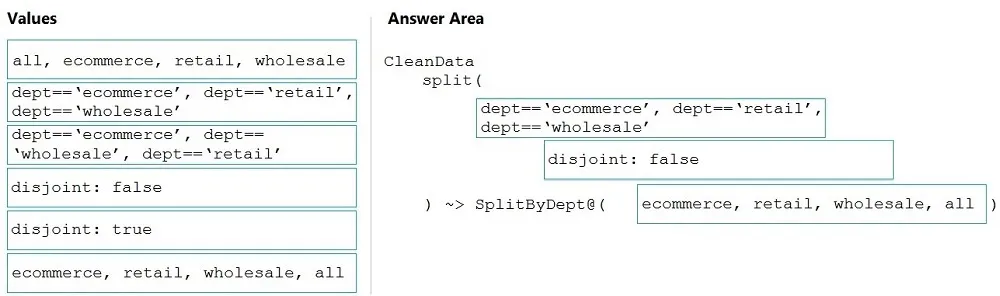
DRAG DROP - You need to create an Azure Data Factory pipeline to process data for the following three departments at your company: Ecommerce, retail, and wholesale. The solution must ensure that data can also be processed for the entire company. How should you complete the Data Factory data flow script? To answer, drag the appropriate values to the correct targets. Each value may be used once, more than once, or not at all. You may need to drag the split bar between panes or scroll to view content. NOTE: Each correct selection is worth one point. Select and Place:

This is an interactive task on the real exam — a drag-and-drop, hotspot or ordering question. There is nothing to select here, so the answer is shown below for reference.
Show the answer figure
Answer: See figure below
Explanation
The conditional split transformation routes data rows to different streams based on matching conditions. The conditional split transformation is similar to a CASE decision structure in a programming language. The transformation evaluates expressions, and based on the results, directs the data row to the specified stream. Box 1: dept=='ecommerce', dept=='retail', dept=='wholesale' First we put the condition. The order must match the stream labeling we define in Box 3. Syntax: <incomingStream> split( <conditionalExpression1> <conditionalExpression2> ... disjoint: {true | false} ) ~> <splitTx>@(stream1, stream2, ..., <defaultStream>) Box 2: discount : false - disjoint is false because the data goes to the first matching condition. All remaining rows matching the third condition go to output stream all. Box 3: ecommerce, retail, wholesale, all Label the streams - Reference: https://docs.microsoft.com/en-us/azure/data-factory/data-flow-conditional-split
Source: Adapted from community discussion — Alekx42
References