Question 11 · 239 in bank
HOTSPOT - Your network contains an Active Directory Domain Services (AD DS) domain. The domain contains a server named Server1 that runs Windows Server. You run Get-BitLockerVolume -MountPoint C,D | fl *, which generates the following output.
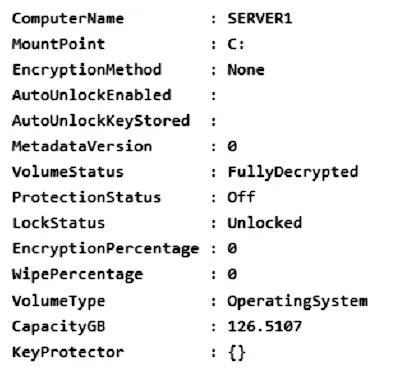
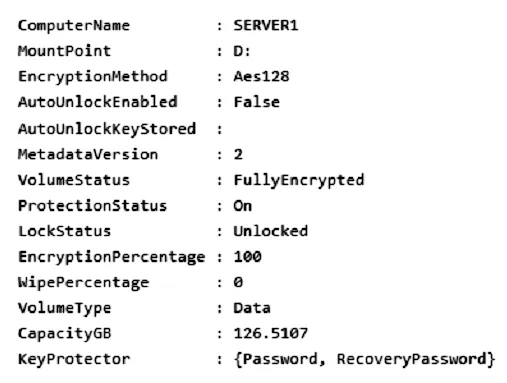
You need to ensure that volume D will be unlocked automatically when Server1 restarts. How should you complete the command? To answer, select the appropriate options in the answer area. NOTE: Each correct selection is worth one point. Hot Area:

This is an interactive task on the real exam — a drag-and-drop, hotspot or ordering question. There is nothing to select here, so the answer is shown below for reference.
Show the answer figure
Answer: See figure below
Explanation
Box 1: Add-BitLockerKeyProtector From the exhibit we see for volume D that AutoUnlockEnabled is False, and AutoUnlockKeyStored is empty. The Add-BitLockerKeyProtector cmdlet adds a protector for the volume key of the volume protected with BitLocker Drive Encryption. Example: The following example adds an ADAccountOrGroup protector to the previously encrypted operating system volume using the SID of the account: Add-BitLockerKeyProtector C: -ADAccountOrGroupProtector -ADAccountOrGroup S-1-5-21-3651336348-8937238915-291003330-500 Active Directory-based protectors are normally used to unlock Failover Cluster enabled volumes. Box 2: Service - The -Service parameter indicates that the system account for this computer unlocks the encrypted volume. Add-BitLockerKeyProtector syntax with use of the ADAccountOrGroupProtector parameter: Add-BitLockerKeyProtector - [-MountPoint] <String[]> [-ADAccountOrGroupProtector] [-ADAccountOrGroup] <String> [-Service] [-WhatIf] [-Confirm] [<CommonParameters>] Incorrect: * Enable-BitLockerAutoUnlock The Enable-BitLockerAutoUnlock cmdlet enables automatic unlocking for a volume protected by BitLocker Disk Encryption. The command has no -ADAccountOrGroupProtector parameter. Syntax: Enable-BitLockerAutoUnlock - [-MountPoint] <String[]> [-WhatIf] [-Confirm] [<CommonParameters>] * The Clear-BitLockerAutoUnlock cmdlet removes all automatic unlocking keys used by BitLocker Drive Encryption. BitLocker stores these keys for the fixed data drives of a system on a volume that hosts a BitLocker-enabled operating system volume so that it can automatically unlock the fixed and removable data volumes in a system. This makes it easier for users to access data volumes. Syntax: Clear-BitLockerAutoUnlock [] Reference: https://docs.microsoft.com/en-us/windows/security/information-protection/bitlocker/bitlocker-use-bitlocker-drive-encryption-tools-to-manage-bitlocker https://docs.microsoft.com/en-us/powershell/module/bitlocker/add-bitlockerkeyprotector
References