Question 81 · 104 in bank
Refer to the exhibit.

Why did FortiGate drop the packet?
Show answer
Answer: D
NSE 4 — FortiOS 7.2 Network Security Professional104 questions across 11 pages are complete and free, with no account or card.
104 questions in this bank
Free access · progress saved on this device
Refer to the exhibit.
Why did FortiGate drop the packet?
Answer: D
What is a reason for triggering IPS fail open?
Answer: A
Tambien hay una referencia en administration guide pag. 1313 A fail-open scenario is triggered when IPS raw socket buffer is full. Therefore IPS engine has no space in memory to create more sessions and needs to decide whether to drop the sessions or bypass the sessions without inspection
Source: Adapted from community discussion — darkstar15
Refer to the exhibits. Exhibit A shows system performance output. Exhibit B shows a FortiGate configured with the default configuration of high memory usage thresholds.
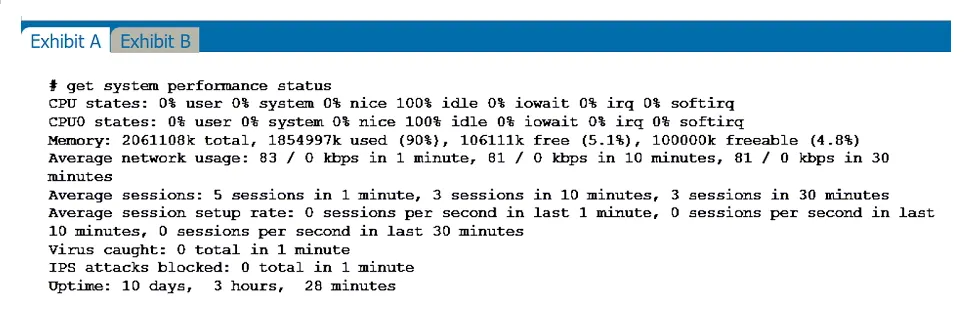

Based on the system performance output, which two results are correct? (Choose two.)
Answer: BC
B. FortiGate has entered conserve mode. C. Administrators cannot change the configuration. Based on the system performance output, it appears that FortiGate has entered conserve mode and administrators cannot change the configuration. FortiGate has entered conserve mode: When FortiGate enters conserve mode, it reduces its operational capacity in order to conserve resources and improve performance. This may be necessary if the system is experiencing high levels of traffic or if there are issues with resource utilization. Administrators cannot change the configuration: When the system is in conserve mode, administrators may not be able to change the configuration. This is because the system is prioritizing resource conservation over other activities, and making changes to the configuration may require additional resources that are not available. It is important to note that FortiGate will not start sending all files to FortiSandbox for inspection, and administrators may still be able to access FortiGate through other means besides the console port.
Source: Adapted from community discussion — Spago
Which statement about the deployment of the Security Fabric in a multi-VDOM environment is true?
Answer: A
A. VDOMs without ports with connected devices are not displayed in the topology. FortiGate Security 7.2 Study Guide (p.436): "When you configure FortiGate devices in multi-vdom mode and add them to the Security Fabric, each VDOM with its assigned ports is displayed when one or more devices are detected. Only the ports with discovered and connected devices appear in the Security Fabric view and, because of this, you must enable Device Detection on ports you want to have displayed in the Security Fabric. VDOMs without ports with connected devices are not displayed. All VDOMs configured must be part of a single Security Fabric." Reference and download study guide: https://ebin.pub/fortinet-fortigate-security-study-guide-for-fortios-72.html
Source: Adapted from community discussion — raydel92
What is the effect of enabling auto-negotiate on the phase 2 configuration of an IPsec tunnel?
Answer: B
B. FortiGate automatically brings up the IPsec tunnel... FortiGate Infrastructure 7.2 Study Guide (p.264): "...then FortiGate might drop interesting traffic because of the absence of active SAs. To prevent this, you can enable Auto-negotiate. When you do this, FortiGate not only negotiates new SAs before the current SAs expire, but it also starts using the new SAs right away." "Another benefit of enabling Auto-negotiate is that the tunnel comes up and stays up automatically, even when there is no interesting traffic. When you enable Autokey Keep Alive and keep Auto-negotiate disabled, the tunnel does not come up automatically unless there is interesting traffic. However, after the tunnel is up, it stays that way because FortiGate periodically sends keep alive packets over the tunnel. Note that when you enable Auto-negotiate, Autokey Keep Alive is implicitly enabled." Reference and download study guide: https://ebin.pub/fortinet-fortigate-infrastructure-study-guide-for-fortios-72.html
Source: Adapted from community discussion — raydel92
A network administrator has enabled full SSL inspection and web filtering on FortiGate. When visiting any HTTPS websites, the browser reports certificate warning errors. When visiting HTTP websites, the browser does not report errors. What is the reason for the certificate warning errors?
Answer: D
D. The browser does not trust the certificate used by FortiGate for SSL inspection. FortiGate Security 7.2 Study Guide (p.235): "If FortiGate receives a trusted SSL certificate, then it generates a temporary certificate signed by the built-in Fortinet_CA_SSL certificate and sends it to the browser. If the browser trusts the Fortinet_CA_SSL certificate, the browser completes the SSL handshake. Otherwise, the browser also presents a warning message informing the user that the site is untrusted. In other words, for this function to work as intended, you must import the Fortinet_CA_SSL certificate into the trusted root CA certificate store of your browser." Reference and download study guide: https://ebin.pub/fortinet-fortigate-security-study-guide-for-fortios-72.html
Source: Adapted from community discussion — raydel92
An employee needs to connect to the office through a high-latency internet connection. Which SSL VPN setting should the administrator adjust to prevent SSL VPN negotiation failure?
Answer: B
B. login-timeout FortiGate Infrastructure 7.2 Study Guide (p.222): "When connected to SSL VPN over high latency connections, FortiGate can time out the client before the client can finish the negotiation process, such as DNS lookup and time to enter a token. Two new CLI commands under config vpn ssl settings have been added to address this. The first command allows you to set up the login timeout, replacing the previous hard timeout value. The second command allows you to set up the maximum DTLS hello timeout for SSL VPN connections." Reference and download study guide: https://ebin.pub/fortinet-fortigate-infrastructure-study-guide-for-fortios-72.html
Source: Adapted from community discussion — raydel92
The HTTP inspection process in web filtering follows a specific order when multiple features are enabled in the web filter profile. Which order must FortiGate use when the web filter profile has features such as safe search enabled?
Answer: B
B. Static URL filter, FortiGuard category filter, and advanced filters FortiGate Security 7.2 Study Guide (p.285): "Remember that the web filtering profile has several features. So, if you have enabled many of them, the inspection order flows as follows: 1. The local static URL filter 2. FortiGuard category filtering (to determine a rating) 3. Advanced filters (such as safe search or removing Active X components)" Reference and download study guide: https://ebin.pub/fortinet-fortigate-security-study-guide-for-fortios-72.html
Source: Adapted from community discussion — raydel92
Refer to the exhibit. The exhibit shows the FortiGuard Category Based Filter section of a corporate web filter profile. An administrator must block access to download.com, which belongs to the Freeware and Software Downloads category. The administrator must also allow other websites in the same category.

What are two solutions for satisfying the requirement? (Choose two.)
Answer: BD
B. Configure a web override rating for download.com and select Malicious... D. Configure a static URL filter entry for download.com with Type and Action... FortiGate Security 7.2 Study Guide (p.268-269): "If you want to make an exception, for example, rather than unblock access to a potentially unwanted category, change the website to an allowed category. You can also do the reverse. You can block a website that belongs to an allowed category." "Static URL filtering is another web filter feature. Configured URLs in the URL filter are checked against the visited websites. If a match is found, the configured action is taken. URL filtering has the same patterns as static domain filtering: simple, regular expressions, and wildcard." A. Configure a separate firewall policy with action Deny and an FQDN address object for *.download.com... (incorrect because you still allow root domain) Download study guide: https://ebin.pub/fortinet-fortigate-security-study-guide-for-fortios-72.html
Source: Adapted from community discussion — raydel92
Refer to the exhibits. Exhibit A shows a network diagram. Exhibit B shows the firewall policy configuration and a VIP object configuration. The WAN (port1) interface has the IP address 10.200.1.1/24. The LAN (port3) interface has the IP address 10.0.1.254/24. The administrator disabled the WebServer firewall policy.


Which IP address will be used to source NAT the traffic, if a user with address 10.0.1.10 connects over SSH to the host with address 10.200.3.1?
Answer: C
If WebServer firewall policy was active it would be A because: SNAT changes it to 10.200.1.10 due to VIP. But correct is C due to the disabled WebServer firewall policy. https://community.fortinet.com/t5/FortiGate/Technical-Tip-How-to-use-VIP-s-External-IP-Address-for-Source/ta-p/189947
Source: Adapted from community discussion — Gorgoyle
Keyboard:J Kmove between questionsA–Dselect an answerRshow or hide the answer← →change page
NSE4_FGT-7.2 practice, question 81. 104 questions available.
Version 1.0.0. How we source questions