Question 151 · 358 in bank
You have a Power BI semantic model that has the tables and relationships shown in the following exhibit.

Which type of dimension is represented by Dim Address?
Show answer
Answer: C
Microsoft Power BI Data Analyst358 questions across 36 pages are complete and free, with no account or card.
358 questions in this bank
Free access · progress saved on this device
You have a Power BI semantic model that has the tables and relationships shown in the following exhibit.
Which type of dimension is represented by Dim Address?
Answer: C
You have a Power BI model that contains a table named Employee. The table contains the following data.

Each employee has one manager as shown in the ParentEmployeeID column. All reporting paths lead to the CEO at the top of the organizational hierarchy. You need to create a calculated column that returns the count of levels from each employee to the CEO. Which DAX expression should you use?
Answer: A
Answer A is correct - tested Although for CEO it returns 1 - so I personally would substract 1 from this PATHLENGTH when creating the report, as I think numbers of levels from CEO to CEO is 0, formanagaers directly under CEO it is 1 etc
Source: Adapted from community discussion — ewelaela
You have a semantic model that uses a live connection to a semantic model in the Power BI service. You need to create a Power BI report named RPT1 that only uses the live connection. Which three components can you add to RPT1? Each correct answer presents a complete solution. NOTE: Each correct selection is worth one point.
Answer: A
HOTSPOT - You have the Power BI data model shown in the following exhibit.

You need to create a measure to count the number of product categories that had products sold during a selected period. How should you complete the DAX expression? To answer, select the appropriate options in the answer area. NOTE: Each correct selection is worth one point.

This is an interactive task on the real exam — a drag-and-drop, hotspot or ordering question. There is nothing to select here, so the answer is shown below for reference.
Answer: See figure below
The question is: the number of product categories that had products sold during a selected period. Tested with data from adventureWorks using: 1 report, 2 cards, 1 slicer card 1 has 'date' card 2 has 'sales' slicer is connected to Date table (using between dates parameters) Using 'Date' will always return all the distinct categories no matter the selected dates in the slicer. Using 'Sales' returns the number of distinct categories sold between the two dates of the slicer correct tested answer is: Distinctcount('Product'[product category], 'sales'
Source: Adapted from community discussion — Dani_eL

HOTSPOT - You have the Power BI data model shown in the following exhibit.

The Sales table has the following columns.
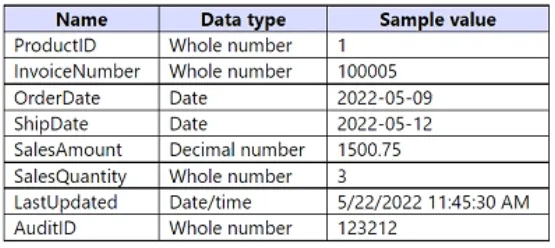
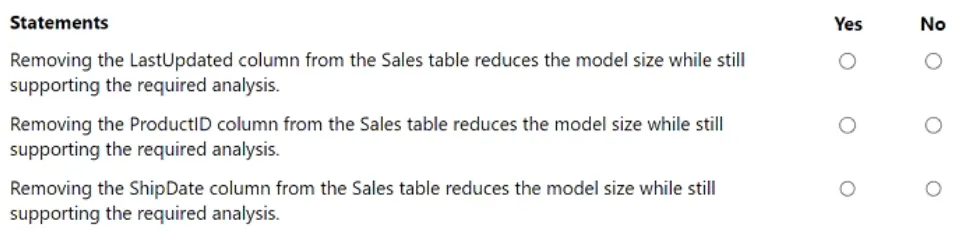
The data model must support the following analysis: • Total sales by product by month in which the order was placed • Quantities sold by product by day on which the order was placed • Number of sales transactions by quarter in which the order was placed For each of the following statements, select Yes if the statement is true. Otherwise, select No. NOTE: Each correct selection is worth one point.
This is an interactive task on the real exam — a drag-and-drop, hotspot or ordering question. There is nothing to select here, so the answer is shown below for reference.
Answer: See figure below
- Total sales by product by month in which the order was placed: This analysis requires the OrderDate, ProductID, and SalesAmount columns. The ShipDate column is not required for this analysis. - Quantities sold by product by day on which the order was placed: This analysis requires the OrderDate, ProductID, and SalesQuantity columns. Again, the ShipDate column is not necessary for this analysis. - Number of sales transactions by quarter in which the order was placed: This analysis requires the OrderDate and InvoiceNumber columns. The ShipDate column is not needed for determining the number of transactions by quarter. Therefore, ShipDate column is not needed. So the 3rd answer should be Yes.
Source: Adapted from community discussion — Dsbuff

You use Power Query Editor to ingest data into Power BI Desktop from two Microsoft SharePoint Online lists named Customers and Locations. Each list contains more than 25,000 rows. Locations is referenced in Customers to generate qualified values in a drop-down list. You create the following query in Power Query Editor.

You experience long load times and discover that Power Query Editor makes calls to the URL of each row in the final dataset. You need to optimize the query. The solution must minimize development effort. What should you do?
Answer: A
You have a Power BI data model that contains a table named Employees. The table has the following columns: • Employee Name • Email Address • Start Date • Job Title You are implementing dynamic row-level security (RLS). You need to create a table filter to meet the following requirements: • Users must see only their own employee data. • The DAX expression must work in both Power BI Desktop and the Power BI service. Which expression should you use?
Answer: D
Within Power BI Desktop, username() will return a user in the format of DOMAIN\User and userprincipalname() will return a user in the format of user@contoso.com. Within the Power BI service, username() and userprincipalname() will both return the user's User Principal Name (UPN). This looks similar to an email address.
Source: Adapted from community discussion — jessiejay
DRAG DROP - You have the Power BI data model shown in the following exhibit.

The Country table contains the following data.

You create two row-level security (RLS) roles named Manager and CFO. You plan to publish the dataset to the Power BI service. You need to create DAX expressions for the RLS filters. The solution must meet the following requirements: • Each manager must see only the data in the Sales and Human Resources tables for their own country. • The CFO must be prevented from seeing the data in the Human Resources table. • The CFO must see the sales data of all countries. How should you complete the DAX expressions to meet the requirements? To answer, drag the appropriate expressions to the correct targets. Each expression may be used once, more than once, or not at all. You may need to drag the split bar between panes or scroll to view content. NOTE: Each correct selection is worth one point.

This is an interactive task on the real exam — a drag-and-drop, hotspot or ordering question. There is nothing to select here, so the answer is shown below for reference.
Answer: See figure below
I simply don't get the answers to the question, or the question at all for that matter. I feel both should have two conditions... Like: HR = AND([Manager] <> "CFO", [Email] = userprinciplename()) Country = OR([MANAGER = "CFO", [Email] = userprinciplename()) What am I missing here?
Source: Adapted from community discussion — semauni

You have a Power BI data model that imports data from a Microsoft Excel spreadsheet. You use Power Query to load a query that contains both renamed and custom columns. Later, you attempt to reload the query and receive the following error message. Expression.Error: The column 'Category' of the table wasn't found. What are two possible causes of the error? Each correct answer presents a complete solution. NOTE: Each correct selection is worth one point.
Answer: AB
A & B are correct answers. A. If the column 'Category' was present in the source file when the query was initially loaded but has been removed from the sources file since then, you would encounter this error when attempting to reload the query. B. If the "Category" column in the source file was renamed after the query was initially loaded, power query wouldn't be able to find the column with the original name, resulting in the error.
Source: Adapted from community discussion — Igetmyrole
HOTSPOT - You create a Power BI dataset that contains the table shown in the following exhibit.

You need to make the table available as an organizational data type in Microsoft Excel. How should you configure the properties of the table? To answer, select the appropriate options in the answer area. NOTE: Each correct selection is worth one point. Hot Area:

This is an interactive task on the real exam — a drag-and-drop, hotspot or ordering question. There is nothing to select here, so the answer is shown below for reference.
Answer: See figure below
Box 1: Cost Center - The Row label field value is used in Excel so users can easily identify the row. It appears as the cell value for a linked cell, in the Data Selector pane, and in the Information card. Box 2: ID - The Key column field value provides the unique ID for the row. This value enables Excel to link a cell to a specific row in the table. Box 3: Yes - In the Data Types Gallery in Excel, your users can find data from featured tables in your Power BI datasets. Reference: https://docs.microsoft.com/en-us/power-bi/collaborate-share/service-create-excel-featured-tables
Source: Adapted from community discussion — Churato


Keyboard:J Kmove between questionsA–Dselect an answerRshow or hide the answer← →change page
PL-300 practice, question 151. 358 questions available.
Version 1.0.0. How we source questions