Question 21 · 394 in bank
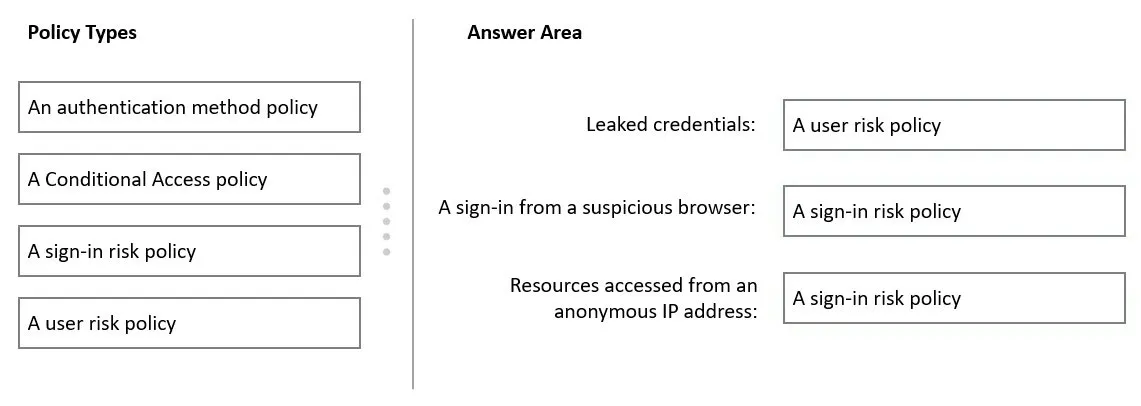
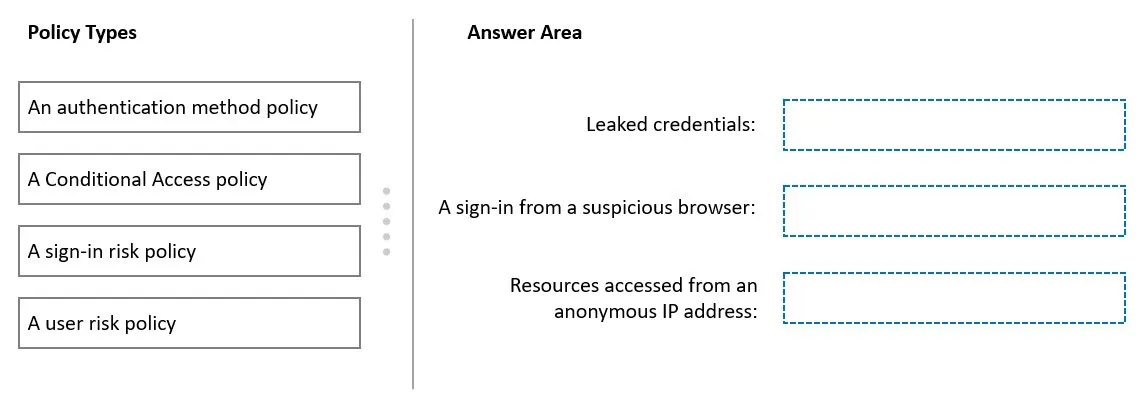
DRAG DROP - You need to resolve the recent security incident issues. What should you configure for each incident? To answer, drag the appropriate policy types to the correct issues. Each policy type may be used once, more than once, or not at all. You may need to drag the split bar between panes or scroll to view content. NOTE: Each correct selection is worth one point. Select and Place:
This is an interactive task on the real exam — a drag-and-drop, hotspot or ordering question. There is nothing to select here, so the answer is shown below for reference.
Show the answer figure
Answer: See figure below
Explanation
Box 1: A user risk policy - User-linked detections include: Leaked credentials: This risk detection type indicates that the user's valid credentials have been leaked. When cybercriminals compromise valid passwords of legitimate users, they often share those credentials. User risk policy. Identity Protection can calculate what it believes is normal for a user's behavior and use that to base decisions for their risk. User risk is a calculation of probability that an identity has been compromised. Administrators can make a decision based on this risk score signal to enforce organizational requirements. Administrators can choose to block access, allow access, or allow access but require a password change using Azure AD self-service password reset. Box 2: A sign-in risk policy - Suspicious browser: Suspicious browser detection indicates anomalous behavior based on suspicious sign-in activity across multiple tenants from different countries in the same browser. Box 3: A sign-in risk policy - A sign-in risks include activity from anonymous IP address: This detection is discovered by Microsoft Defender for Cloud Apps. This detection identifies that users were active from an IP address that has been identified as an anonymous proxy IP address. Note: The following three policies are available in Azure AD Identity Protection to protect users and respond to suspicious activity. You can choose to turn the policy enforcement on or off, select users or groups for the policy to apply to, and decide if you want to block access at sign-in or prompt for additional action. * User risk policy Identifies and responds to user accounts that may have compromised credentials. Can prompt the user to create a new password. * Sign in risk policy Identifies and responds to suspicious sign-in attempts. Can prompt the user to provide additional forms of verification using Azure AD Multi-Factor Authentication. * MFA registration policy Makes sure users are registered for Azure AD Multi-Factor Authentication. If a sign-in risk policy prompts for MFA, the user must already be registered for Azure AD Multi-Factor Authentication. Reference: https://docs.microsoft.com/en-us/azure/active-directory/identity-protection/concept-identity-protection-policies
Source: Adapted from community discussion — 0byte
References