Question 151 · 570 in bank
HOTSPOT - You have an Azure AD tenant that contains a user named External User. External User authenticates to the tenant by using external195@gmail.com. You need to ensure that External User authenticates to the tenant by using contractor@gmail.com. Which two settings should you configure from the Overview blade? To answer, select the appropriate settings in the answer area. NOTE: Each correct answer is worth one point.
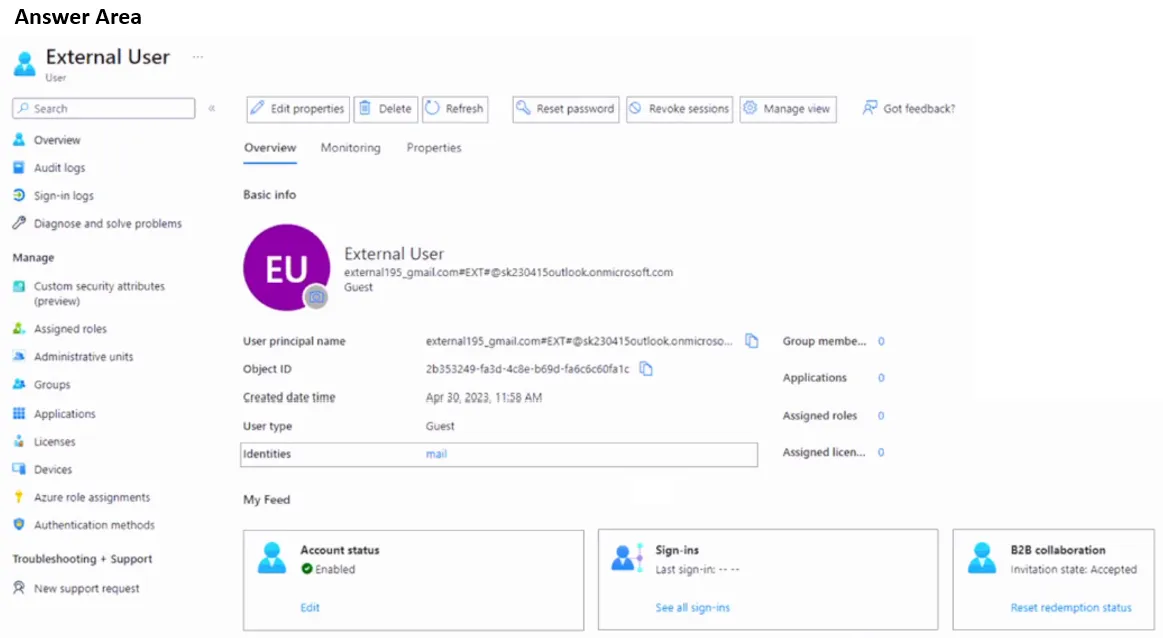
This is an interactive task on the real exam — a drag-and-drop, hotspot or ordering question. There is nothing to select here, so the answer is shown below for reference.
Show the answer figure
Answer: See figure below
Explanation
If the user wants to sign in using a different email: - Select the Edit properties icon. - Scroll to Email and type the new email. - Next to Other emails, select Add email. Select Add, type the new email, and select Save. - Select the Save button at the bottom of the page to save all changes On the Overview tab, under My Feed, select the "Reset redemption" status link in the B2B collaboration tile. https://learn.microsoft.com/en-us/azure/active-directory/external-identities/reset-redemption-status#use-the-microsoft-entra-admin-center-to-reset-redemption-status
Source: Adapted from community discussion — Vestibal
References