Question 261 · 277 in bank
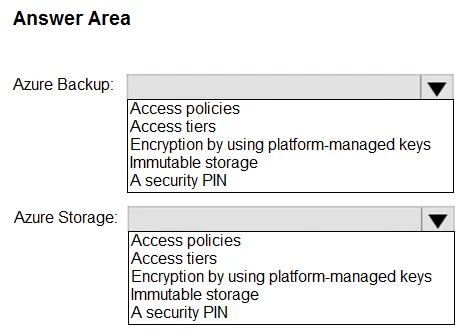
HOTSPOT - Your company wants to optimize using Azure to protect its resources from ransomware. You need to recommend which capabilities of Azure Backup and Azure Storage provide the strongest protection against ransomware attacks. The solution must follow Microsoft Security Best Practices. What should you recommend? To answer, select the appropriate options in the answer area. NOTE: Each correct selection is worth one point.
This is an interactive task on the real exam — a drag-and-drop, hotspot or ordering question. There is nothing to select here, so the answer is shown below for reference.
Show the answer figure
Answer: See figure below
Explanation
1. Security PIN 2. Immutable storage https://learn.microsoft.com/en-us/azure/security/fundamentals/backup-plan-to-protect-against-ransomware#azure-backup Checks have been added to make sure only valid users can perform various operations. These include adding an extra layer of authentication. As part of adding an extra layer of authentication for critical operations, you're prompted to enter a security PIN before modifying online backups. https://learn.microsoft.com/en-us/azure/security/fundamentals/backup-plan-to-protect-against-ransomware#steps-to-take-before-an-attack Online immutable storage (such as Azure Blob) enables you to store business-critical data objects in a WORM (Write Once, Read Many) state. This state makes the data non-erasable and non-modifiable for a user-specified interval.
Source: Adapted from community discussion — zellck