Question 31 · 383 in bank
You have a Microsoft 365 subscription that uses Microsoft Intune. You need to ensure that you can deploy apps to Android Enterprise devices. What should you do first?
Show answer
Answer: D
Endpoint Administrator383 questions across 39 pages are complete and free, with no account or card.
383 questions in this bank
Free access · progress saved on this device
You have a Microsoft 365 subscription that uses Microsoft Intune. You need to ensure that you can deploy apps to Android Enterprise devices. What should you do first?
Answer: D
You have a Microsoft 365 tenant that uses Microsoft Intune. You use the Company Portal app to access and install published apps to enrolled devices. From the Microsoft Intune admin center, you add a Microsoft Store app. Which two App information types are visible in the Company Portal? NOTE: Each correct selection is worth one point.
Answer: AB
In the New MS App Store type apps, I am seeing the Privacy URL prefilled but info URL being empty, same as Developer and Owner. In this, I'd go with Info URL option as Developer + Owner is something you'll always have to manually fill while Publisher comes pre-filled.
Source: Adapted from community discussion — oopspruu
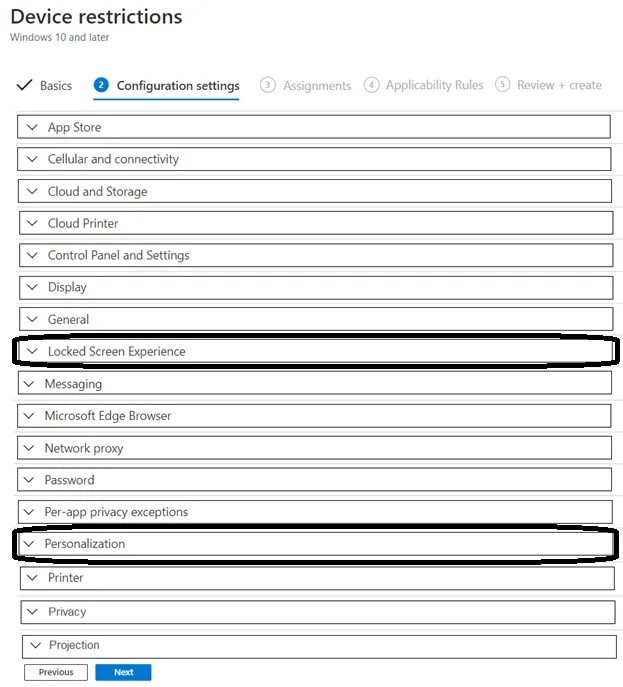
HOTSPOT - You have 200 computers that run Windows 10. The computers are joined to Azure AD and enrolled in Microsoft Intune. You need to set a custom image as the wallpaper and sign-in screen. Which two settings should you configure in the Device restrictions configuration profile? To answer, select the appropriate settings in the answer area. NOTE: Each correct selection is worth one point.
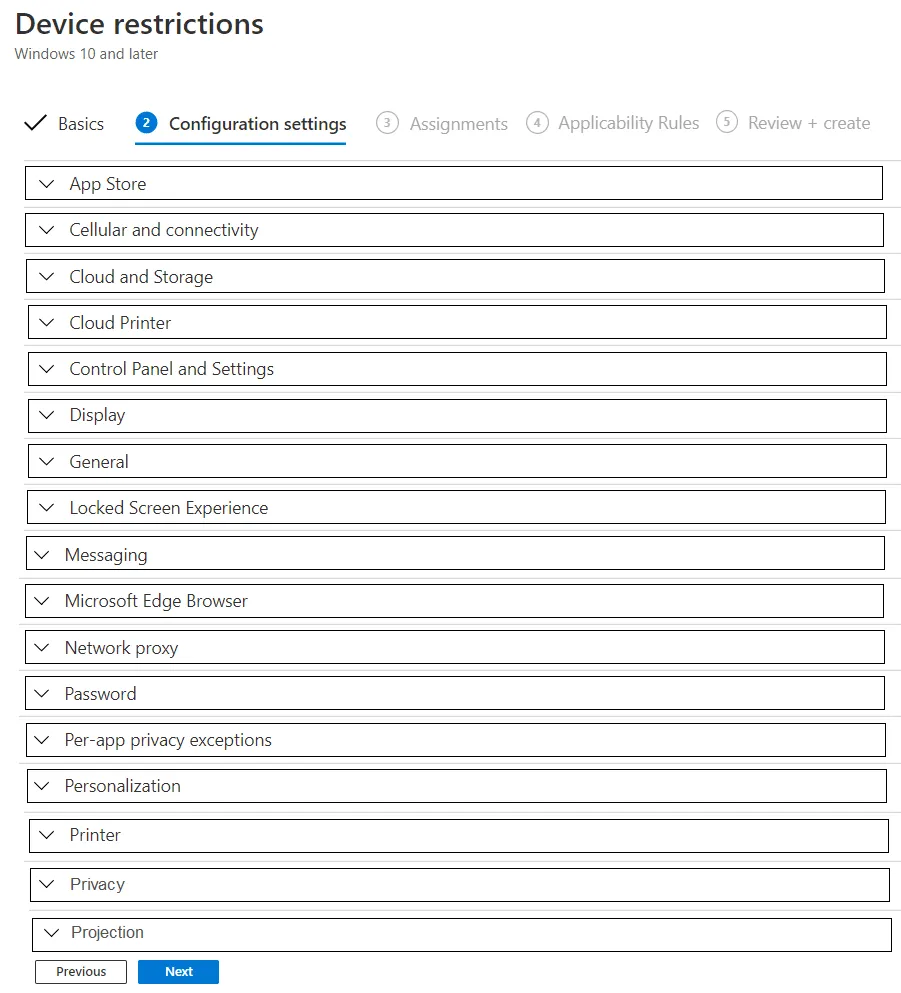
This is an interactive task on the real exam — a drag-and-drop, hotspot or ordering question. There is nothing to select here, so the answer is shown below for reference.
Answer: See figure below
lock screen Experience > "locked screen picture url" option. Personnalization > "Desktop background picture url" option. so answers are correct.
Source: Adapted from community discussion — Casticod
You have computers that run Windows 11 Pro. The computers are joined to Azure AD and enrolled in Microsoft Intune. You need to upgrade the computers to Windows 11 Enterprise. What should you configure in Intune?
Answer: D
As a gentle reminder, DO NOT TRUST Chat GPT. I see a lot of people here just providing ChatGPT answers instead of using their own brain and logic. Learn WHY the answer is correct. For this one, the setting is found in Devices > Windows > Configuration > Templates > Edition Upgrade and Mode Switch > Edition to upgrade to > choose Windows 10/11 Enterprise. This is why D is correct answer.
Source: Adapted from community discussion — oopspruu
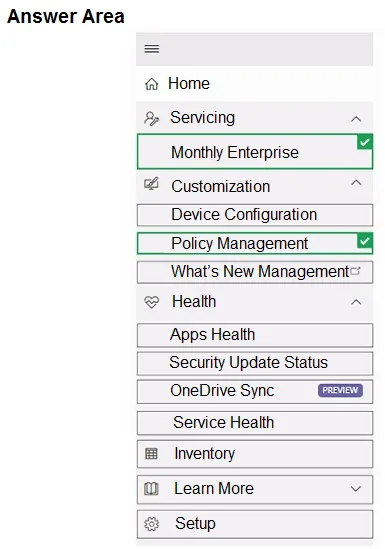
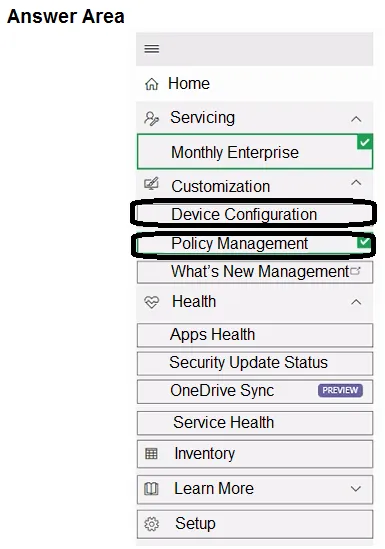
HOTSPOT - All users have Microsoft 365 apps deployed. You need to configure Microsoft 365 apps to meet the following requirements: Enable the automatic installation of WebView2 Runtime. Prevent users from submitting feedback. Which two settings should you configure in the Microsoft 365 Apps admin center? To answer, select the appropriate settings in the answer area. NOTE: Each correct selection is worth one point.
This is an interactive task on the real exam — a drag-and-drop, hotspot or ordering question. There is nothing to select here, so the answer is shown below for reference.
Answer: See figure below
Anwser is correct You can enable automatic installation in the same setting as where you prevent it from being installed automatically: To prevent the automatic installation of WebView2 Runtime, sign in to the Microsoft 365 Apps admin center (https://config.office.com) with an admin account. Then, go to Customization > Device Configuration > Modern Apps Settings. Select Microsoft Edge WebView2 and then clear the Enable automatic installation of WebView2 Runtime check box. https://learn.microsoft.com/en-us/deployoffice/webview2-install Prevent users from submitting feedback: https://learn.microsoft.com/en-us/microsoft-365/admin/manage/manage-feedback-ms-org?view=o365-worldwide
Source: Adapted from community discussion — Darkfire
You have computers that run Windows 10 and are managed by using Microsoft Intune. Users store their files in a folder named D:\Folder1. You need to ensure that only a trusted list of applications is granted write access to D:\Folder1. What should you configure in the device configuration profile?
Answer: A
A. Microsoft Defender Exploit Guard This is an ASR rule which is part of Exploit Guard Ref: https://learn.microsoft.com/en-us/microsoft-365/security/defender-endpoint/enable-controlled-folders?view=o365-worldwide#microsoft-intune Ref: https://learn.microsoft.com/en-us/microsoft-365/security/defender-endpoint/attack-surface-reduction-rules-deployment-implement?view=o365-worldwide
Source: Adapted from community discussion — Merrybob
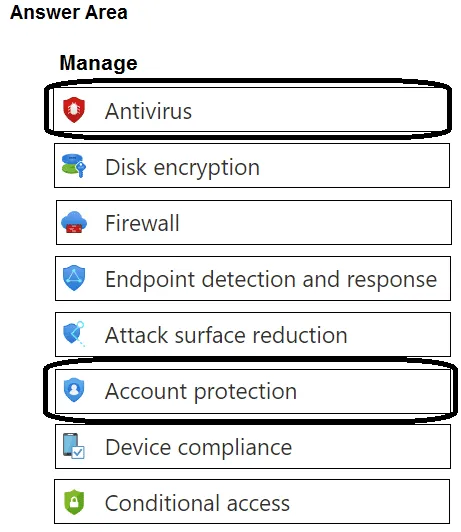
HOTSPOT - You have a Microsoft 365 E5 subscription that contains 100 Windows 10 devices enrolled in Microsoft Intune. You need to create Endpoint security policies to meet the following requirements: • Hide the Firewall & network protection area in the Windows Security app. • Disable the provisioning of Windows Hello for Business on the devices. Which two policy types should you use? To answer, select the policies in the answer area. NOTE: Each correct selection is worth one point.
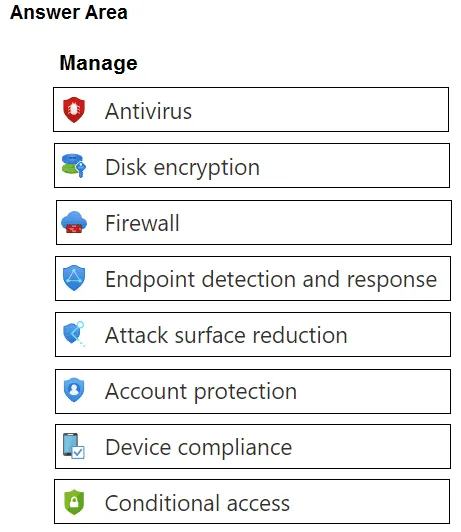
This is an interactive task on the real exam — a drag-and-drop, hotspot or ordering question. There is nothing to select here, so the answer is shown below for reference.
You have a Microsoft 365 subscription that contains 100 devices enrolled in Microsoft Intune. You need to review the startup processes and how often each device restarts. What should you use?
Answer: A
To review the startup processes and how often each device restarts in Microsoft Intune, we should use Endpoint analytics. Endpoint analytics provides insights into the performance and health of your devices, including startup and restart data. So, the correct option is: A. Endpoint analytics we can use this feature to gain valuable insights into device performance, user experience, and more, helping we make informed decisions about device management and optimization.
Source: Adapted from community discussion — Grg433
DRAG DROP - You have a Microsoft 365 subscription that contains devices enrolled in Microsoft Intune. You need to create Endpoint security policies to enforce the following requirements: • Computers that run macOS must have FileVault enabled. • Computers that run Windows 10 must have Microsoft Defender Credential Guard enabled. • Computers that run Windows 10 must have Microsoft Defender Application Control enabled. Which Endpoint security feature should you use for each requirement? To answer, drag the appropriate features to the correct requirements. Each feature may be used once, more than once, or not at all. You may need to drag the split bar between panes or scroll to view content.
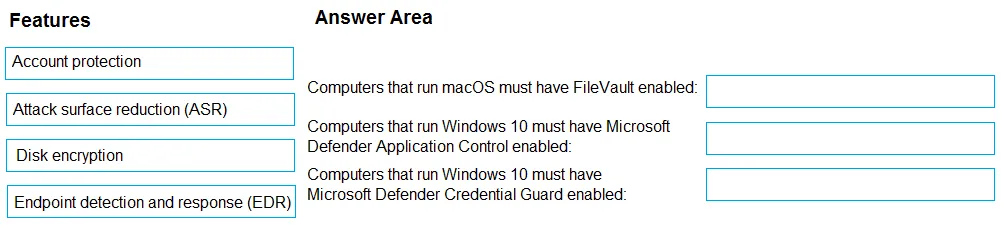
This is an interactive task on the real exam — a drag-and-drop, hotspot or ordering question. There is nothing to select here, so the answer is shown below for reference.
Your company has 200 computers that run Windows 10. The computers are managed by using Microsoft Intune. Currently, Windows updates are downloaded without using Delivery Optimization. You need to configure the computers to use Delivery Optimization. What should you create in Intune?
Answer: C
Keyboard:J Kmove between questionsA–Dselect an answerRshow or hide the answer← →change page
MD-102 practice, question 31. 383 questions available.
Version 1.0.0. How we source questions