Question 241 · 383 in bank
You have a Microsoft 365 subscription and use Microsoft Intune Suite. The subscription contains devices enrolled in Intune as shown in the following table.

Which devices support Device query?
Show answer
Answer: A
Endpoint Administrator383 questions across 39 pages are complete and free, with no account or card.
383 questions in this bank
Free access · progress saved on this device
You have a Microsoft 365 subscription and use Microsoft Intune Suite. The subscription contains devices enrolled in Intune as shown in the following table.
Which devices support Device query?
Answer: A
You have a Microsoft 365 E5 subscription that contains devices enrolled in Microsoft Intune. You plan to use Device query to provide on-demand information about the state of the devices. The solution must minimize costs. What should you do first?
Answer: B
B correct https://learn.microsoft.com/en-us/mem/analytics/device-query Prerequisites To use Device query in your tenant, you must have a license that includes Microsoft Intune Advanced Analytics. Advanced Analytics features are available with: The Intune Advanced Analytics Add-on Microsoft Intune Suite
Source: Adapted from community discussion — Crille
You have a Microsoft Entra tenant that contains the devices shown in the following table.

On which devices can you implement Endpoint Privilege Management (EPM)?
Answer: A
Device must be Entra ID joined and Intune Enrolled. "Requirements Endpoint Privilege Management has the following requirements: - Microsoft Entra joined or Microsoft Entra hybrid joined. - Microsoft Intune Enrollment or Microsoft Configuration Manager co-managed devices (no workload requirements). - Supported Operating System. - Clear line of sight (without SSL-Inspection) to the required endpoints. Note: - Windows 365 (CloudPC) is supported using a supported operating system version - Workplace-join devices are not supported by Endpoint Privilege Management - Azure Virtual Desktop is not supported by Endpoint Privilege Management" Ref: https://learn.microsoft.com/en-us/mem/intune/protect/epm-overview#prerequisites:~:text=on%20capabilities.-,Requirements,Azure%20Virtual%20Desktop%20is%20not%20supported%20by%20Endpoint%20Privilege%20Management,-Endpoint%20Privilege%20Management
Source: Adapted from community discussion — Knight_Of_Peace
HOTSPOT - You have a Microsoft 365 ES subscription and use Microsoft Intune Suite. You manage the following types of devices: • Windows 11 • Android • iOS You need to implement Microsoft Tunnel for Mobile Application Management (MAM) to provide the devices with access to on-premises company apps. What should you deploy first, and which device types can use Tunnel for MAM? To answer, select the appropriate options in the answer area. NOTE: Each correct selection is worth one point.

This is an interactive task on the real exam — a drag-and-drop, hotspot or ordering question. There is nothing to select here, so the answer is shown below for reference.
You have a Microsoft 365 E5 subscription and 25 Apple iPads. You need to enroll the iPads in Microsoft Intune by using the Apple Configurator enrollment method. What should you do first?
Answer: A
To enroll the Apple iPads in Microsoft Intune using the Apple Configurator enrollment method, you should first configure an Apple MDM push certificate. This certificate is required to establish trust between the iPads and the Intune service, enabling them to enroll and be managed through Intune. After obtaining the MDM push certificate, you can proceed with the enrollment process using the Apple Configurator tool.
Source: Adapted from community discussion — Haider_Raza
HOTSPOT - You have a Microsoft 365 subscription that includes Microsoft Intune and Microsoft Defender for Endpoint. Users have devices that run Windows 11. You deploy a connection from Defender for Endpoint to Intune. You need to ensure that when a device is enrolled in Intune, the device is onboarded automatically to Defender for Endpoint. What should you configure, and which portal should you use? To answer, select the appropriate options in the answer area. NOTE: Each correct selection is worth one point.

This is an interactive task on the real exam — a drag-and-drop, hotspot or ordering question. There is nothing to select here, so the answer is shown below for reference.
Answer: See figure below
Correct, nboarding package for Microsoft Defender is another method to onboard devices to Defender for Endpoint. However, this method is typically used for manual onboarding or when you need to onboard devices that are not managed by Intune.
Source: Adapted from community discussion — yhano

HOTSPOT - You have a Microsoft 365 E5 subscription that contains the devices shown in the following table.

The subscription contains the dynamic device groups shown in the following table.

For each of the following statements, select Yes if the statement is true. Otherwise, select No. NOTE: Each correct selection is worth one point.

This is an interactive task on the real exam — a drag-and-drop, hotspot or ordering question. There is nothing to select here, so the answer is shown below for reference.
Answer: See figure below
Group1: Joined (AzureAD) & Windows -> Device2. Group2: Registred (Wrokplace) -> Device3. Device1: ServerAD -> Not in Group1 or Group2. Based on the above: NNY
Source: Adapted from community discussion — SaadKhamis

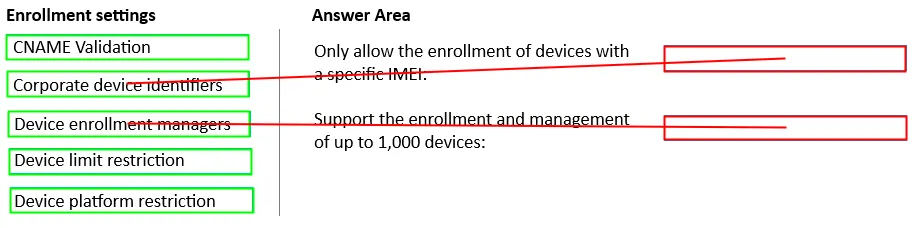
DRAG DROP - You have a Microsoft 365 subscription. You plan to enroll devices in Microsoft Intune. You need to meet the following requirements: • Only allow the enrollment of devices that have a specific international mobile equipment identifier (IMEI). • Support the enrollment and management of up to 1,000 devices. Which enrollment setting should you configure for each requirement? To answer, drag the appropriate settings to the correct requirements. Each setting may be used once, more than once, or not at all. You may need to drag the split bar between panes or scroll to view content. NOTE: Each correct selection is worth one point.

This is an interactive task on the real exam — a drag-and-drop, hotspot or ordering question. There is nothing to select here, so the answer is shown below for reference.
Answer: See figure below
1. To only allow the enrollment of devices with a specific international mobile equipment identifier (IMEI), you should use: b. Corporate device identifiers This setting allows you to identify and pre-declare corporate-owned devices by their IMEI numbers, ensuring that only devices with specific IMEIs can be enrolled. 2. To support the enrollment and management of up to 1,000 devices, you should use: c. Device enrollment managers Device enrollment manager accounts can enroll and manage up to 1,000 devices, which meets the requirement for supporting up to 1,000 devices.
Source: Adapted from community discussion — Meek_Learner
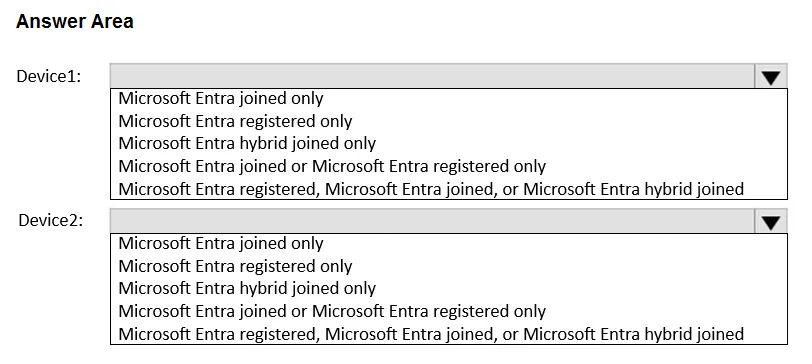
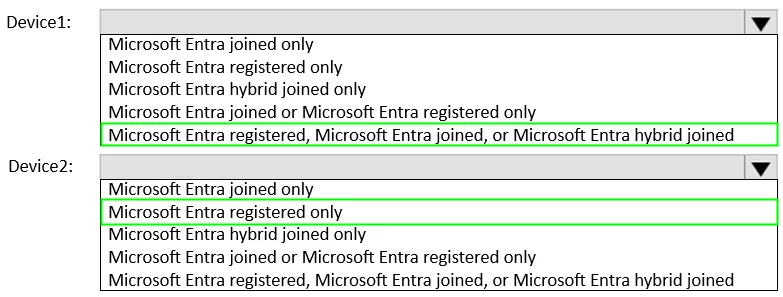
HOTSPOT - You have a hybrid environment that contains a Microsoft Entra tenant and an on-premises Active Directory Domain Services (AD DS) domain. The environment contains the devices shown in the following table.

Which Microsoft Entra join type can each device use? To answer, select the appropriate options in the answer area. NOTE: Each correct selection is worth one point.
This is an interactive task on the real exam — a drag-and-drop, hotspot or ordering question. There is nothing to select here, so the answer is shown below for reference.
Answer: See figure below
But the question status: Which Microsoft Entra join type CAN each device use. Windows CAN be Entra-joined, Hybrid-joined, etc. IOS can not, only registered. I believe answer is correct.
Source: Adapted from community discussion — HvD
You have a Microsoft 365 E5 subscription that contains a group named Group1. You need to ensure that only the members of Group1 can join devices to the Microsoft Entra tenant. What should you configure in the Microsoft Entra admin center?
Answer: A
Keyboard:J Kmove between questionsA–Dselect an answerRshow or hide the answer← →change page
MD-102 practice, question 241. 383 questions available.
Version 1.0.0. How we source questions
