Question 1 · 16 in bank
What does the following Icon indicate about the user?

Show answer
Answer: C
CrowdStrike Certified Identity Specialist16 questions across 2 pages are complete and free, with no account or card.
16 questions in this bank
Free access · progress saved on this device
What does the following Icon indicate about the user?
Answer: C

The meaning of the icons shown are watched, inactive, privileged and _______________?
Answer: C
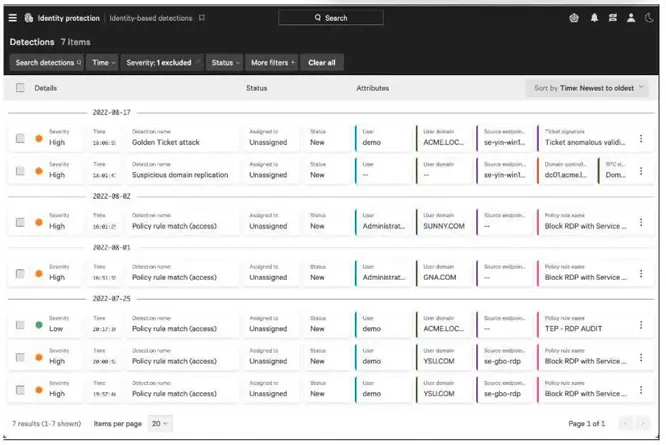
Which of the following are not included within the three-dot menu on Identity-based Detections?
Answer: C
In the Domain security overview, there are 4 different goals that can be addressed, each characterized by the specific risks. Which of the following is NOT one of those goals?
Answer: D
Which section within the Falcon documentation would you be able to find supported versions of Active Directory Federation Services (AD FS)?
Answer: D
On the Risk Analysis dashboard, _______________ displays a bar graph showing the distribution of risk scores by OU or department with each bar color-coded to show the count of users by risk score.
Answer: B
Which section of the Falcon Identity Protection module do you use to manage your Policy Rule groups?
Answer: D
You want to create a destination-based identity protection policy rule on an application being accessed. What is the best trigger to use?
Answer: B
An administrator wants to remove a rule from an existing rule group. How would that be accomplished?
Answer: D
Where in the Identity Protection Module can one view the monitoring status of domain controllers?
Answer: C
Keyboard:J Kmove between questionsA–Dselect an answerRshow or hide the answer← →change page
CCIS practice, question 1. 16 questions available.
Version 1.0.0. How we source questions