Question 131 · 149 in bank
What is the order of virus scanning when multilayer antivirus scanning is configured?
Show answer
Answer: D
Securing Email with Cisco Email Security Appliance (SESA)149 questions across 15 pages are complete and free, with no account or card.
149 questions in this bank
Free access · progress saved on this device
What is the order of virus scanning when multilayer antivirus scanning is configured?
Answer: D
A company has deployed a new mandate that requires all emails sent externally from the Sales Department to be scanned by DLP for PCI-DSS compliance. A new DLP policy has been created on the Cisco ESA and needs to be assigned to a mail policy named ‘Sales’ that has yet to be created. Which mail policy should be created to accomplish this task?
Answer: A
Correct. Overview of Mail Policies The appliance enforces your organization’s policies for messages sent to and from your users through the use of mail policies. These are sets of rules that specify the types of suspect, sensitive, or malicious content that your organization may not want entering or leaving your network. This content may include: spam legitimate marketing messages graymail viruses phishing and other targeted mail attacks confidential corporate data personally identifiable information https://www.cisco.com/c/en/us/td/docs/security/esa/esa11-1/user_guide/b_ESA_Admin_Guide_11_1/b_ESA_Admin_Guide_chapter_01001.html
Source: Adapted from community discussion — GVKD
DRAG DROP - An administrator must ensure that emails sent from cisco_123@externally.com are routed through an alternate virtual gateway. Drag and drop the snippet from the bottom onto the blank in the graphic to finish the message filter syntax. Not all snippets are used.
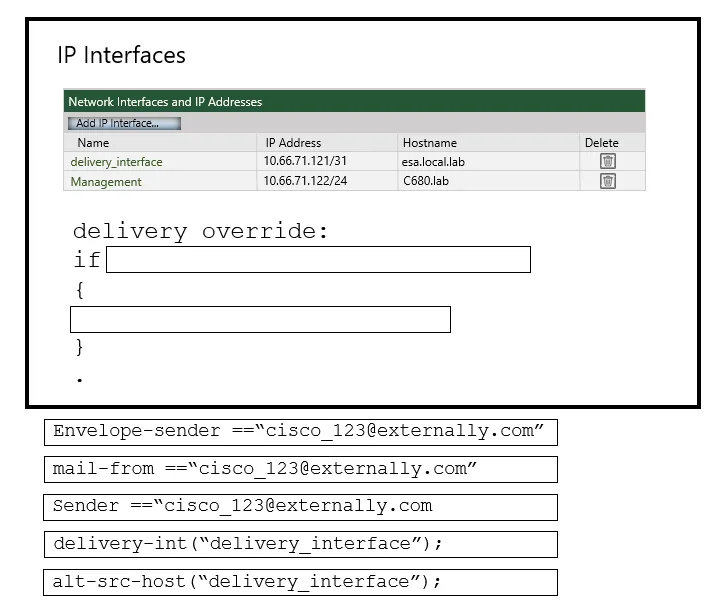
This is an interactive task on the real exam — a drag-and-drop, hotspot or ordering question. There is nothing to select here, so the answer is shown below for reference.
Answer: See figure below
MAIL-FROM & ALT-SRC-HOST are Correct alt-src-host Message Filter action can be used to specify the IP interface for message delivery as an action for your choice of criteria using Message Filter rules. This will override both deliveryconfig and the altsrchost table. Should you choose to set up a filter, reviewing the section titled Message Filters in the AsyncOS Advanced User Guide is highly recommended. mail-from Does the Envelope Sender (i.e., the Envelope From, ) match a given pattern? See Envelope Sender Rule.
Source: Adapted from community discussion — GVKD

Spreadsheets containing credit card numbers are being allowed to bypass the Cisco ESA. Which outgoing mail policy feature should be configured to catch this content before it leaves the network?
Answer: C
C is Correct. C is Correct. Content matching classifiers require rules for detecting DLP violations in a message or document. Classifiers can use one or more of the following detection rules: Entity. A predefined pattern that identifies common types of sensitive data, such as credit card numbers, addresses, social security numbers, or ABA routing numbers. For descriptions of the entities, go to Mail Policies > DLP Policy Manager, click Add DLP Policy, click Privacy Protection, then click Display Policy Descriptions. https://www.cisco.com/c/en/us/td/docs/security/esa/esa11-1/user_guide/b_ESA_Admin_Guide_11_1/b_ESA_Admin_Guide_chapter_010001.html?bookSearch=true
Source: Adapted from community discussion — GVKD
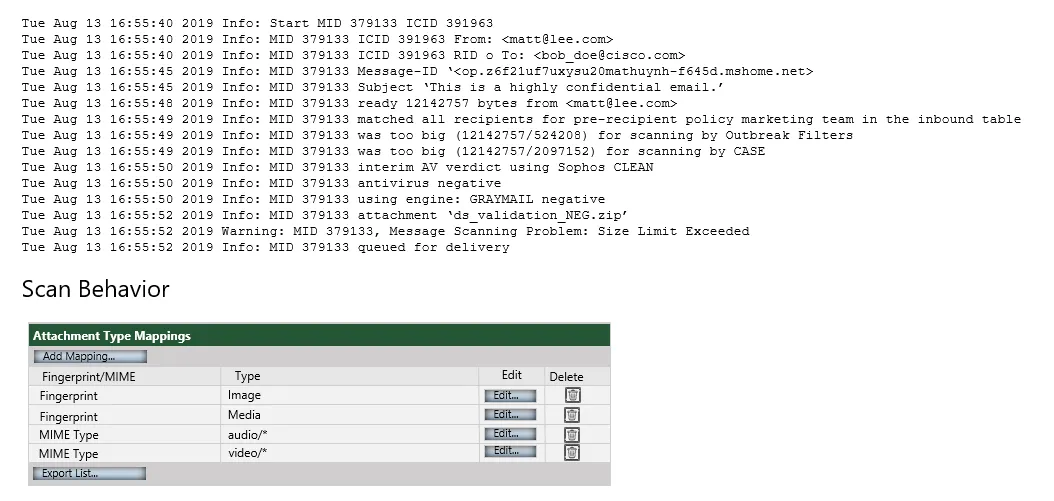
Refer to the exhibit. Which configuration on the scan behavior must be updated to allow the attachment to be scanned on the Cisco ESA?
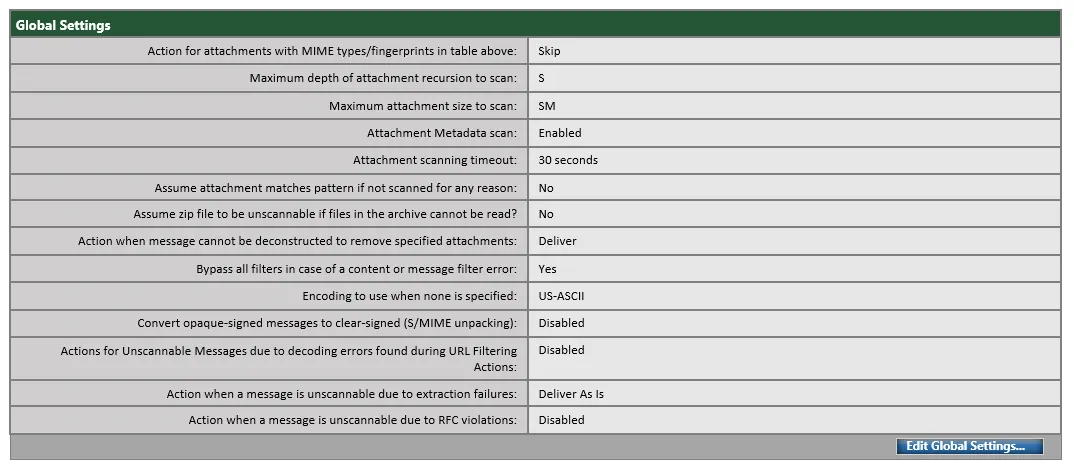
Answer: D
Users have been complaining of a higher volume of emails containing profanity. The network administrator will need to leverage dictionaries and create specific conditions to reduce the number of inappropriate emails. Which two filters should be configured to address this? (Choose two.)
Answer: AE
A and E are Correct. Content Dictionaries Content dictionaries are groups of words or entries that work in conjunction with the Body Scanning feature on the appliance and are available to both content and message filters. https://www.cisco.com/c/en/us/td/docs/security/esa/esa11-1/user_guide/b_ESA_Admin_Guide_11_1/b_ESA_Admin_Guide_chapter_010110.html?bookSearch=true
Source: Adapted from community discussion — GVKD

Refer to the exhibit. What is the correct order of commands to set filter 2 to active?
Answer: D
Correct. Message Filters Subcommands. set: Sets filter to active or inactive state. For more information, see Creating a New Message Filter. For Example, using the filter -> set subcommand. https://www.cisco.com/c/en/us/td/docs/security/esa/esa11-1/user_guide/b_ESA_Admin_Guide_11_1/b_ESA_Admin_Guide_chapter_01000.html?bookSearch=true
Source: Adapted from community discussion — GVKD

Refer to the exhibit. What results from this filter configuration?
Answer: C
A content dictionary was created for use with Forged Email Detection. Proper data that pertains to the CEO “Example CEO” must be entered. What must be added to the dictionary to accomplish this goal?
Answer: B
B is Correct. Setting Up Forged Email Detection Identify the users in your organization (for example, executives) whose messages are likely to be forged. Create a new content dictionary and add the names of the identified users to it. While creating a content dictionary, Enter the name of the user and not the email address. For example, enter “ Olivia Smith ” instead of “ olivia.smith@example.com .” https://www.cisco.com/c/en/us/td/docs/security/esa/esa11-1/user_guide/b_ESA_Admin_Guide_11_1/b_ESA_Admin_Guide_11_1_chapter_010101.html#con_1260492
Source: Adapted from community discussion — GVKD
A Cisco ESA administrator recently enabled the Outbreak Filters Global Service Setting to detect Viral as well as Non-Viral threat detection, with no detection of Non-Viral threats after 24 hours of monitoring Outbreak Filters. What is the reason that Non-Viral threat detection is not detecting any positive verdicts?
Answer: C
Correct. By default, the Outbreak Filters feature scans your incoming and outgoing messages for possible viruses during an outbreak. You can enable scanning for non-viral threats in addition to virus outbreaks if you enable anti-spam scanning on the appliance . Note Your appliance needs a feature key for Anti-Spam or Intelligent Multi-Scan in order for Outbreak Filters to scan for non-viral threats. https://www.cisco.com/c/en/us/td/docs/security/esa/esa11-1/user_guide/b_ESA_Admin_Guide_11_1/b_ESA_Admin_Guide_chapter_01110.html?bookSearch=true
Source: Adapted from community discussion — GVKD
Keyboard:J Kmove between questionsA–Dselect an answerRshow or hide the answer← →change page
300-720 practice, question 131. 149 questions available.
Version 1.0.0. How we source questions